MCP server · Developer tools
mcptoon MCP manager
by activeing123
Share one set of AI tools and skills across all your AI apps, with far less context used.
mcptoon is a small helper program you install once on your computer. It keeps all your AI tools and skills in one place and shares them with every AI app you use, like Claude Desktop, Cursor, or Codex. It is handy if you use more than one AI app and are tired of setting up the same things again and again.
What is an MCP server? The 30-second version
On its own, your AI can only chat with you. An MCP server is a small helper program that gives your AI a new skill or a connection to another app or service. mcptoon is a helper that manages other MCP servers for you. Instead of adding each tool to each AI app by hand, you add it once in mcptoon, and every AI app on your machine can use it.
What this MCP server does
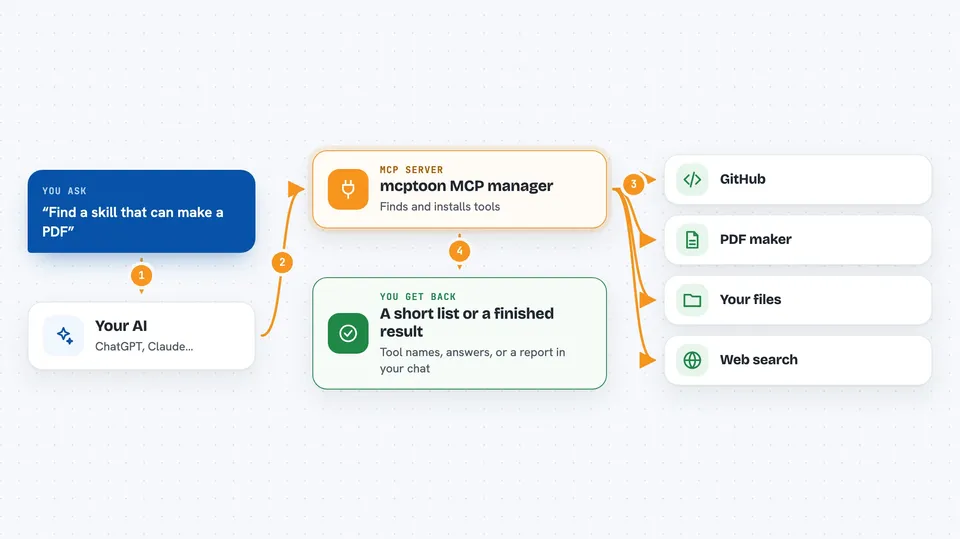
You install mcptoon once with a single command. It looks at your computer, finds the MCP servers you already have, and writes the setup for you. When you want a new tool, you ask mcptoon to search for it and install it, and it becomes available to all your AI apps right away. Your AI then runs mcptoon behind the scenes when it needs a tool, so you do not have to edit any config files yourself.
 Click to zoom
What you can do with it
- Install a new AI tool once and use it from every AI app on your computer
- Search a large catalog of MCP servers and install one by name
- Find and add skills by describing what you want to do
- See a simple list of all the tools you have available
- Run a tool directly from the command line and see the result
- Measure how much space your tools and skills take up in your AI's memory
- Undo everything and put your old setup back exactly as it was
Try asking your AI
- “Search for a GitHub tool and install it for me”
- “What tools do I have available right now?”
- “Find a skill that can make a PDF”
- “Show me how much context my current tools are using”
What it gives back to you
When you ask for a list, mcptoon shows a short list of tool names and what they do. When you run a tool, you get its result back in your chat, like text, numbers, or a small summary. It can also show you a report of how much space your tools take up. Nothing is hidden: you can always ask for the full details of any tool.
Before you start
What you need
- Python installed on your computer
- A terminal or command prompt to run the install command
- At least one AI app that supports MCP servers, like Claude Desktop or Cursor
Good to know
mcptoon can change your AI app settings and run tools that may do things on your computer, so check what a tool does before you install it.
Install it with your AI
Add mcptoon MCP manager to your AI, no technical skills needed
You don't install anything by hand. You copy one prompt, paste it into an AI that can work on your computer, and it checks, installs and connects the server for you, asking you when it needs something.
Sign in to get the install prompt
Members get a ready-made prompt that lets the Claude desktop app check mcptoon MCP manager, install it and connect it for them, step by step. You don't need any technical skills: you copy, paste and answer a few questions. Your connected AI can also find and install any of the 4,609 MCP servers here for you.
Who it's for
Anyone who uses more than one AI app and wants their tools and skills to work everywhere without setting them up again each time.