MCP server · Developer tools · official
Nimbus MCP server
by nimbus-agent · official
Lets your AI search your engineering tools like GitHub, Jira, Slack and PagerDuty in one place.
Nimbus is a helper that connects your AI assistant to a local index of your engineering tools. It pulls together things like code changes, tickets, chat messages, alerts and deployment numbers so you can ask questions in plain English. It is handy if you work with developers, support teams or anyone who juggles several work apps at once.
What is an MCP server? The 30-second version
On its own, your AI can only chat with you. An MCP server is a small helper program that gives your AI a new skill or a connection to an app or service. This one connects your AI to a local index of your engineering stack, so it can look things up across GitHub, Jira, Slack, PagerDuty, Datadog and similar tools when you ask. You stay in the chat, and the helper does the digging.
What this MCP server does
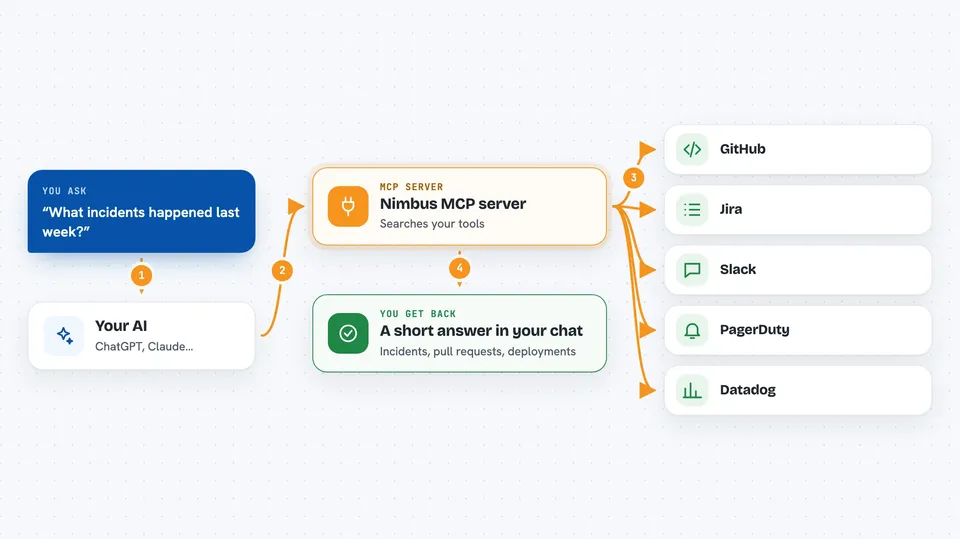
You ask your AI a question in normal words, like what happened with a recent incident or which pull requests are still open. The AI sends that question to the Nimbus helper running on your computer. Nimbus looks through its local index of your engineering tools, which it built from sources like GitHub, Jira, Slack, PagerDuty and Datadog. It finds the matching items, such as incidents, pull requests, deployments or DORA metrics, and sends them back. Your AI then turns those results into a short answer or list for you in the chat.
 Click to zoom
What you can do with it
- Search for incidents across your engineering tools
- Find pull requests and see their status
- Look up recent deployments
- Check DORA metrics like deployment frequency
- Search Slack messages for context
- Find Jira tickets related to a topic
- See PagerDuty alerts and Datadog events
Try asking your AI
- “What incidents happened last week?”
- “Show me open pull requests in the payments repo”
- “When was the last deployment to production?”
- “What are our DORA metrics for this month?”
What it gives back to you
You get back a short answer or a list in your chat. For example, it might list incident names with dates, show pull request titles and authors, or give you a number like deployment frequency. The results come from the local index, so they reflect what Nimbus has already gathered from your tools.
Before you start
What you need
- A local index of your engineering tools set up by Nimbus
- Access to the tools you want to search, like GitHub or Jira
- The Nimbus MCP server running on your computer
Good to know
It is read-only, so it will not change anything, but it can see private work data like code, tickets and chat messages, so treat the results with care.
Install it with your AI
Add Nimbus MCP server to your AI, no technical skills needed
You don't install anything by hand. You copy one prompt, paste it into an AI that can work on your computer, and it checks, installs and connects the server for you, asking you when it needs something.
Sign in to get the install prompt
Members get a ready-made prompt that lets the Claude desktop app check Nimbus MCP server, install it and connect it for them, step by step. You don't need any technical skills: you copy, paste and answer a few questions. Your connected AI can also find and install any of the 4,361 MCP servers here for you.
Who it's for
This is most useful for engineering managers, developers, support leads and anyone who needs quick answers from several work tools without switching apps.