MCP server · Developer tools
BoltMCP installer
by wegotdocs
Lets your AI walk you through installing BoltMCP on a Kubernetes cluster, step by step.
BoltMCP is a helper that installs a piece of software called BoltMCP onto a Kubernetes cluster, which is a way of running apps on a group of computers. This page is about the installer helper that lets your AI guide you through that setup. It is handy if your team already runs things on Kubernetes and you want to add BoltMCP without reading a long manual.
What is an MCP server? The 30-second version
On its own, your AI can only chat with you. An MCP server is a small helper program that gives your AI a new skill or a connection to something outside the chat. This one connects your AI to the BoltMCP installer, so when you ask it to set up, update, or remove BoltMCP, the AI can actually run those steps for you instead of just explaining them.
What this MCP server does
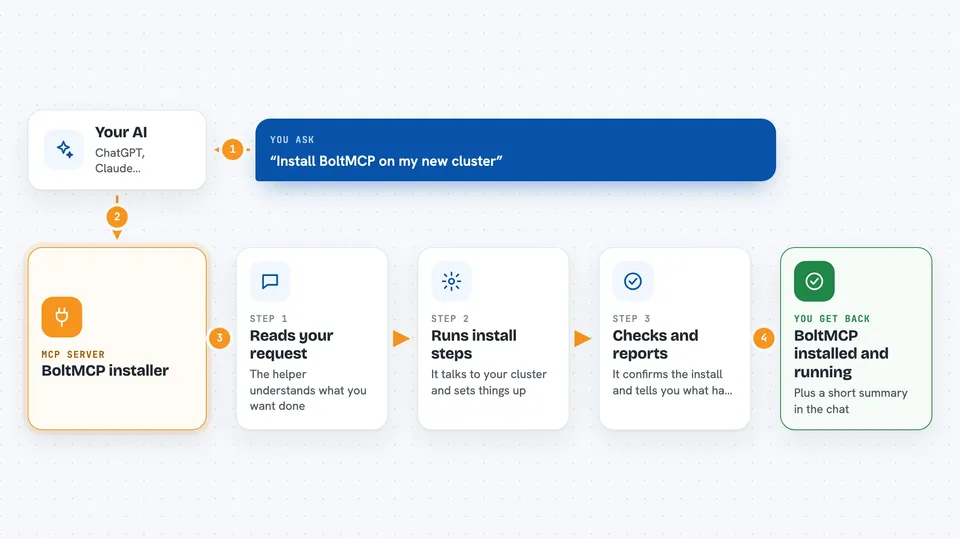
You open Claude Code inside the BoltMCP folder and type a short instruction, like asking it to install BoltMCP on a new cluster. The AI reads that request and uses this helper to run the installation steps. The helper talks to your Kubernetes cluster and sets BoltMCP up there. When it is done, you get a working BoltMCP install and a short report of what happened, all inside the chat.
 Click to zoom
What you can do with it
- Install BoltMCP on a new Kubernetes cluster
- Update an existing BoltMCP installation
- Uninstall BoltMCP when you no longer need it
- Walk through the setup steps with your AI guiding you
- Run the installation from inside Claude Code with one instruction
Try asking your AI
- “Install BoltMCP on a new cluster”
- “Update my BoltMCP installation to the latest version”
- “Uninstall BoltMCP from my cluster”
- “Walk me through installing BoltMCP step by step”
What it gives back to you
You get a running BoltMCP install on your cluster, plus a short summary in the chat of what the AI did at each step. If something goes wrong, the AI tells you what it tried and where it got stuck. You can also ask follow-up questions in the same chat.
Before you start
What you need
- A Kubernetes cluster to install BoltMCP on
- A BoltMCP access key file (a small file the BoltMCP team gives you)
- Claude Code installed and logged in
- The BoltMCP repository cloned onto your computer
Good to know
This helper installs, updates, and removes software on your Kubernetes cluster, so make sure you are pointing at the right cluster before you run it.
Install it with your AI
Add BoltMCP installer to your AI, no technical skills needed
You don't install anything by hand. You copy one prompt, paste it into an AI that can work on your computer, and it checks, installs and connects the server for you, asking you when it needs something.
Sign in to get the install prompt
Members get a ready-made prompt that lets the Claude desktop app check BoltMCP installer, install it and connect it for them, step by step. You don't need any technical skills: you copy, paste and answer a few questions. Your connected AI can also find and install any of the 4,361 MCP servers here for you.
Who it's for
Developers and IT staff who already work with Kubernetes and want a guided way to install BoltMCP.