
MCP server · Notes
RoBrain decision memory
by adelinamart
Your AI remembers what your team already decided and warns before it suggests an approach you rejected.
RoBrain is a memory helper for your coding AI. It quietly records the decisions your team makes and the options you turned down, then reminds the AI about them later. It is handy if you work in a shared codebase and are tired of the same bad idea coming back.
What is an MCP server? The 30-second version
On its own, your AI can only chat about what is in front of it. An MCP server is a small helper program that gives your AI a new skill or a connection to a service. This one connects your AI to RoBrain, a memory store that lives on your own computer. So when you ask your AI to change something, it can first check what your team already decided and what they ruled out.
What this MCP server does
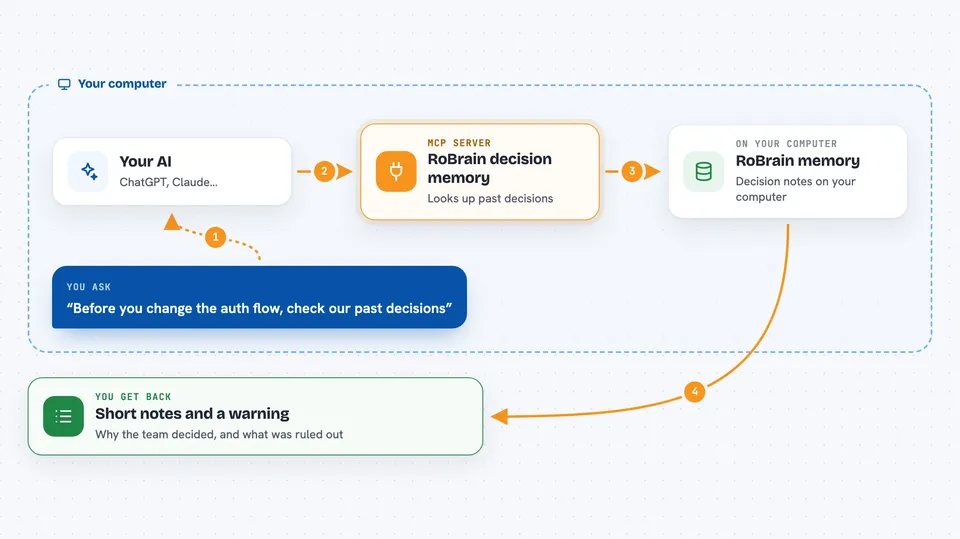
You ask your AI to make a change or add a feature. The AI uses this helper to look up RoBrain's memory of past decisions in your project. The helper searches the stored decisions and finds any that relate to your request, including approaches your team rejected. If it finds a conflict, it tells the AI before the AI goes ahead. You get an answer that respects your team's history instead of repeating old mistakes.
 Click to zoom
What you can do with it
- Remember decisions your team made in past coding sessions
- Warn your AI before it suggests an approach you already rejected
- Show the history behind a file or a change
- Spot contradictions between decisions made in different sessions
- Share the same memory across Claude Code, Cursor, Copilot, and Codex CLI
- Export a decision ledger you can keep in your project
Try asking your AI
- “Why did we decide to keep Perception on Hono instead of porting to Express?”
- “Before you change the auth flow, check if we already rejected that approach.”
- “What decisions have been made about the database migration?”
- “Show me the history of decisions for this file.”
What it gives back to you
RoBrain gives back short notes about past decisions, including the reasons and any alternatives that were rejected. It can also show a list of decisions for a file or a warning that your current request conflicts with something your team already ruled out. In the chat, this looks like a few sentences or a small list, not a long report.
Before you start
What you need
- A Postgres database (for the self-hosted option)
- An Anthropic API key and an OpenAI API key (for the default self-hosted setup)
- Node.js installed on your computer
- The Claude desktop app or another editor that supports MCP
Good to know
It reads your coding sessions and stores them in a database, so be careful if your sessions contain secrets or private code.
Install it with your AI
Add RoBrain decision memory to your AI, no technical skills needed
You don't install anything by hand. You copy one prompt, paste it into an AI that can work on your computer, and it checks, installs and connects the server for you, asking you when it needs something.
Sign in to get the install prompt
Members get a ready-made prompt that lets the Claude desktop app check RoBrain decision memory, install it and connect it for them, step by step. You don't need any technical skills: you copy, paste and answer a few questions. Your connected AI can also find and install any of the 4,609 MCP servers here for you.
Who it's for
Software teams and developers who work together on the same codebase and want their AI assistants to remember past decisions.


