
MCP server · Notes
CogniRepo MCP server
by ashlesh-t
Give your AI a lasting memory of your codebase, so it remembers past decisions, errors, and symbols.
CogniRepo is a memory helper for AI coding tools. It sits between your code and your AI, so your AI remembers what happened before instead of starting from zero every time. It is handy if you work on a codebase with thousands of lines and use Claude Code, Cursor, or Gemini CLI.
What is an MCP server? The 30-second version
On its own, your AI can only chat with what is in front of it. An MCP server is a small helper program that gives your AI a new skill or a connection. CogniRepo is that helper for your codebase: it reads and remembers your project, then answers your AI's questions about symbols, files, decisions, and past errors. You install it once, connect it to your AI tool, and it keeps working in the background.
What this MCP server does
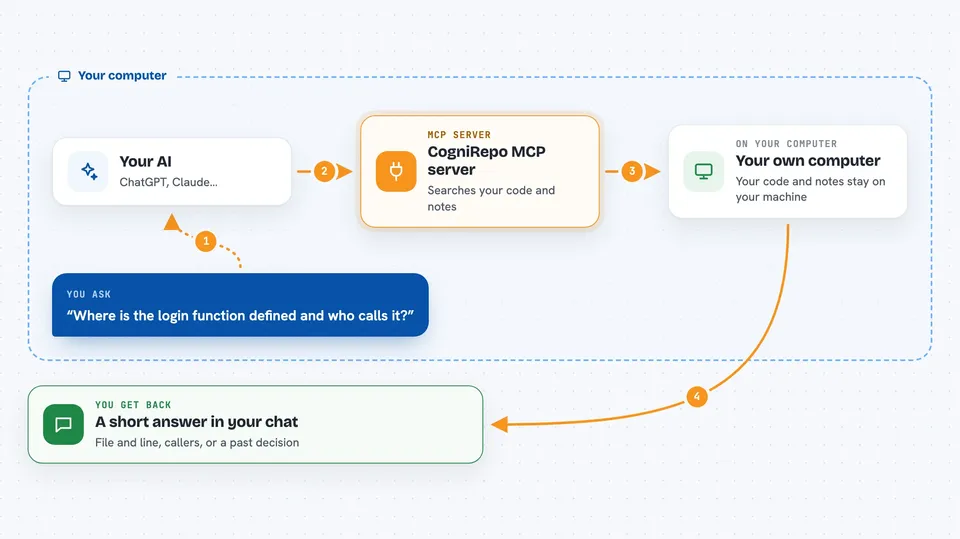
You ask your AI something about your project, like where a function lives or why a change was made. Your AI asks CogniRepo instead of guessing. CogniRepo looks in its local index of your code, its memory of past notes and decisions, and its journal of past events. It sends back the exact file and line, or a short summary, and your AI uses that to answer you. Everything runs on your own machine, so no code is sent anywhere for indexing.
 Click to zoom
What you can do with it
- Find the exact file and line for a function or class name
- See who calls a function before you change it
- Search your past notes, decisions, and incidents in plain language
- Remember errors so your AI does not repeat the same mistake
- Carry context from one AI tool to another, like Claude to Gemini
- Store a new decision or memory so it is there next session
- Get a big-picture summary of how your project is built
Try asking your AI
- “Where is the login function defined and who calls it?”
- “What did we decide about the caching layer last month?”
- “Have we hit this database error before, and how did we fix it?”
- “Give me a quick overview of the main modules in this repo.”
What it gives back to you
You get short, direct answers in your chat: a file path with a line number, a list of callers, a summary of a past decision, or a note about a past error. Sometimes it returns a small context pack, which is a few lines of code and memory notes chosen to fit a token budget. It does not dump whole files unless you ask for that.
Before you start
What you need
- Python 3.11 or newer
- pipx installed (a tool that installs Python apps cleanly)
- An AI tool that supports MCP, like Claude Code, Cursor, or Gemini CLI
- An API key only if you want to use the cognirepo ask command (optional)
Good to know
It reads your project files and stores notes about them locally, so be careful if your codebase contains secrets or private information, and check that you are pointing it at the right project folder.
Install it with your AI
Add CogniRepo MCP server to your AI, no technical skills needed
You don't install anything by hand. You copy one prompt, paste it into an AI that can work on your computer, and it checks, installs and connects the server for you, asking you when it needs something.
Sign in to get the install prompt
Members get a ready-made prompt that lets the Claude desktop app check CogniRepo MCP server, install it and connect it for them, step by step. You don't need any technical skills: you copy, paste and answer a few questions. Your connected AI can also find and install any of the 4,361 MCP servers here for you.
Who it's for
Developers and engineers who work on medium to large codebases and want their AI assistant to remember the project across sessions and tools.


