
MCP server · Notes
codemem MCP server
by kunickiaj
Your AI remembers coding decisions and traps from past sessions and brings them back when you ask.
codemem is a memory helper for coding assistants like Claude Code, OpenCode, and Codex. It quietly notes the decisions you make, the dead ends you hit, and the odd traps in your project, then reminds your AI about them later. It is handy if you keep forgetting why something was done a certain way.
What is an MCP server? The 30-second version
On its own, your AI can only chat with you in the moment. An MCP server is a small helper program that gives your AI a new skill or a connection to something else. Here, codemem is that helper: it connects your AI to a local memory store of your project's past work. So when you ask about an earlier decision, your AI can look it up instead of guessing.
What this MCP server does
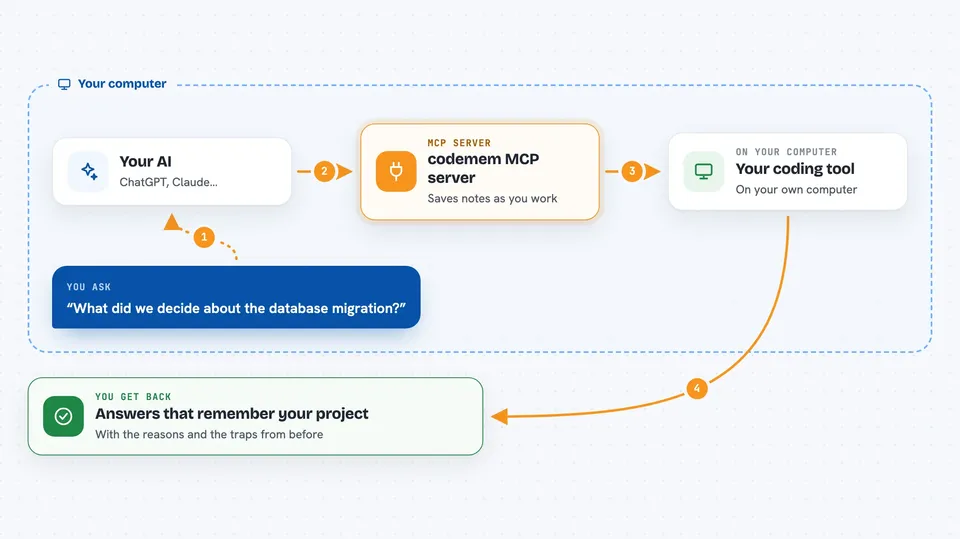
You work as usual in your coding tool. codemem watches the session and writes down useful things, like what you decided and what did not work. When you start a new session and ask a question, your AI asks codemem for related memories. codemem searches its local store and hands back the relevant bits. Your AI then uses those bits to answer you with the right context.
 Click to zoom
What you can do with it
- Recall a past decision and the reason behind it
- Find project-specific traps you ran into before
- Search your saved memories by keyword or meaning
- Browse memories and sessions in a local web viewer
- Share selected project memory with a teammate
- Sync memories across your own machines
- See what was captured and when
Try asking your AI
- “What decision did we make about the database migration, and why?”
- “Did we already try using a queue for this job? What happened?”
- “What is the known trap with the auth token refresh in this project?”
- “Show me recent memories about the payment service.”
What it gives back to you
You get answers in your chat that sound like your AI actually remembers the project. It can list related memories, summarize what was decided, or point to the original session. In the local viewer at localhost:38888 you can also browse the raw memories and sessions yourself. Some answers come from keyword search, some from meaning-based search, and codemem merges both.
Before you start
What you need
- Node.js 24.15 or newer and npm (or pnpm)
- A supported coding tool: OpenCode 1.18.29+, Claude Code, or Codex
- An account or API key for the model that turns activity into memories (this can cost money or use your plan)
Good to know
codemem stores memories on your machine, but it sends captured context to the model you choose to turn activity into memories, and that can cost money or use your plan.
Install it with your AI
Add codemem MCP server to your AI, no technical skills needed
You don't install anything by hand. You copy one prompt, paste it into an AI that can work on your computer, and it checks, installs and connects the server for you, asking you when it needs something.
Sign in to get the install prompt
Members get a ready-made prompt that lets the Claude desktop app check codemem MCP server, install it and connect it for them, step by step. You don't need any technical skills: you copy, paste and answer a few questions. Your connected AI can also find and install any of the 4,609 MCP servers here for you.
Who it's for
Developers and small teams who use AI coding assistants daily and want the assistant to remember project history across sessions.



