
MCP server · Design tools
AI Diagram Maker MCP server
by erajasekar
Turn plain English, code, or a whiteboard photo into a clean diagram right inside your AI chat.
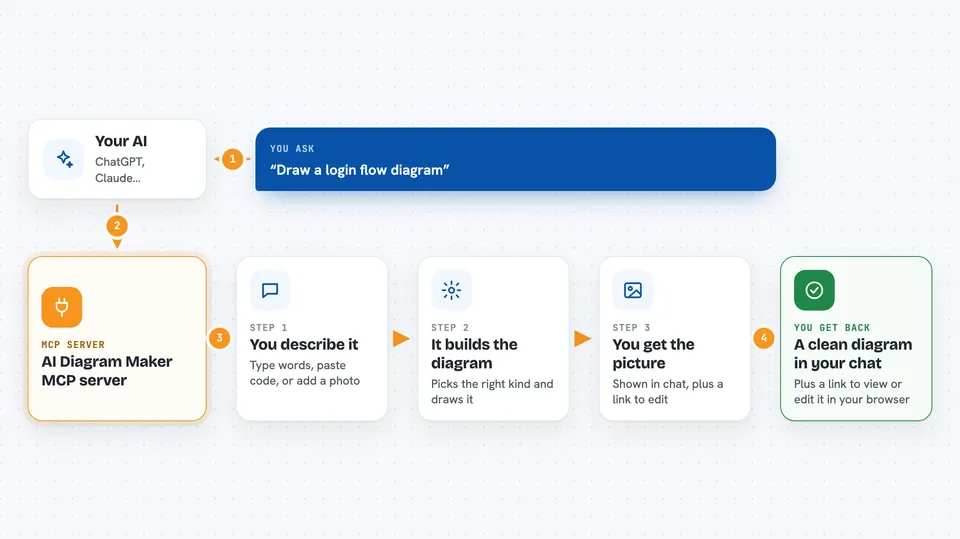
This is a helper that lets your AI draw software diagrams for you. You describe what you want in normal words, and a picture of the diagram shows up in the chat. It is handy for anyone who needs a flowchart, a system picture, or a database layout without opening a drawing tool.
What is an MCP server? The 30-second version
On its own, your AI can only chat with you in text. An MCP server is a small helper program that gives your AI a new skill or a connection to another service. This one connects your AI to AI Diagram Maker, a website that turns descriptions into diagrams. So when you ask for a diagram, your AI hands the request to this helper, and the helper talks to AI Diagram Maker for you.
What this MCP server does
You type a request like draw a login flow, and your AI picks the right tool from this server. The server sends your words, code, or image to AI Diagram Maker. AI Diagram Maker builds the diagram and sends it back. The picture is shown right in the chat, and you also get a link you can open in your browser to view or edit it. You can ask for a flowchart, a sequence diagram, an ERD, a system architecture picture, or a UML diagram.
 Click to zoom
What you can do with it
- Draw a flowchart from a plain English description
- Turn a database schema or JSON into an ERD
- Convert a whiteboard photo or screenshot into a clean diagram
- Turn ASCII art into a polished picture
- Convert a Mermaid diagram into a rendered image
- Ask for a sequence diagram of a login or payment flow
- Sketch a system architecture with services and databases
Try asking your AI
- “adm show the CI/CD pipeline for a Next.js app deployed to Vercel”
- “Create a sequence diagram for user login with JWT token generation”
- “Draw an ERD from this database schema and show the relationships”
- “Turn this whiteboard photo into a clean architecture diagram”
What it gives back to you
You get the diagram as a picture shown right in the chat, so you do not have to download anything. You also get a link you can open in your browser to view or edit the diagram. If something goes wrong, you get a short message explaining the problem.
Before you start
What you need
- An AI Diagram Maker account and API key (the site gives you one when you sign up)
- Node.js 18 or newer if you run it on your own computer
- An AI app that supports MCP, like Cursor, Claude Desktop, or Claude Code
Good to know
It sends your request text, code, or image to the AI Diagram Maker service, so avoid pasting anything private or confidential.
Install it with your AI
Add AI Diagram Maker MCP server to your AI, no technical skills needed
You don't install anything by hand. You copy one prompt, paste it into an AI that can work on your computer, and it checks, installs and connects the server for you, asking you when it needs something.
Sign in to get the install prompt
Members get a ready-made prompt that lets the Claude desktop app check AI Diagram Maker MCP server, install it and connect it for them, step by step. You don't need any technical skills: you copy, paste and answer a few questions. Your connected AI can also find and install any of the 4,361 MCP servers here for you.
Who it's for
Developers, architects, and anyone who needs to explain a system or process with a quick diagram.





