MCP server · Analytics
Hiberden MCP server
by Agaveis
Ask your AI about your Hiberden archive catalog and check that backups really exist on disk, NAS, cloud and tape.
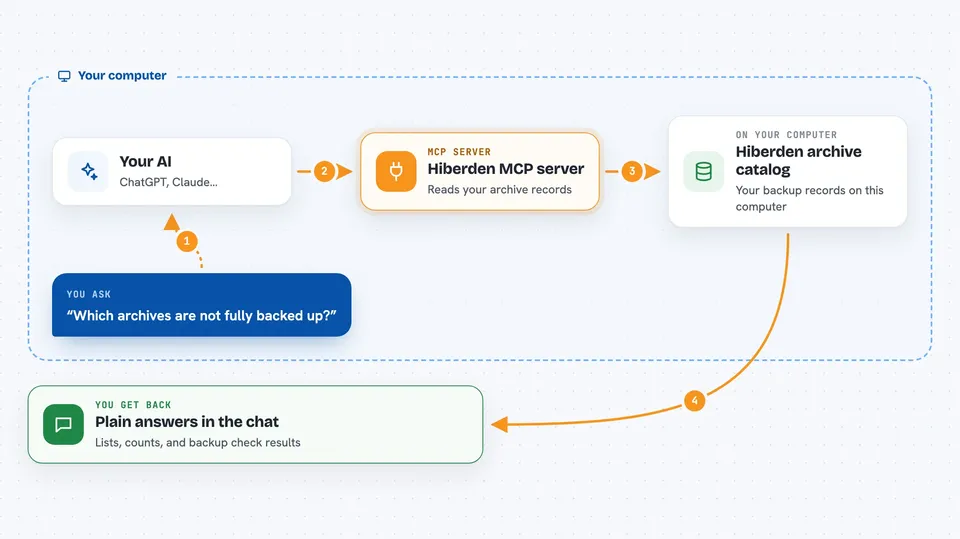
This is a small helper that lets your AI assistant look inside your Hiberden archive catalog. Hiberden is a backup tool that keeps copies of your files in several places (disk, NAS, cloud storage, tape) and this helper lets your AI read that catalog and check whether the copies are really there. It is handy if you keep a media archive and want a quick, plain answer about what is backed up and what is not.
What is an MCP server? The 30-second version
On its own, your AI can only chat. An MCP server is a small helper program that gives your AI a new skill or a connection to an app, and here it connects your AI to your local Hiberden archive catalog. Once it is set up, you can ask questions in plain words and the AI will use this helper to look things up in the catalog. The helper runs on your own computer and, by default, does not send anything over the internet.
What this MCP server does
You ask your AI something like which archives are not fully backed up. The AI passes your question to this helper, which opens your Hiberden catalog file and reads the records inside. The helper sends back a short answer, a list or a table, and the AI explains it to you in the chat. If you ask it to verify a copy, the helper actually re-reads that copy from the disk, NAS or tape and checks the fingerprint matches what was recorded. It then tells you whether the copy passed, failed or is missing.
 Click to zoom
What you can do with it
- List your projects and see how many archives each one holds
- List archives with their size, fingerprint and 3-2-1 backup coverage
- See a library-wide roll-up of how many archives are fully covered, at risk or unprotected
- Look up one archive in full detail, including every copy and where it lives
- List your destinations (tape, local disk, NAS, cloud) and your tapes
- Find a file by name across every archive and see where it is stored
- Verify a copy by re-reading it from its medium and checking the fingerprint
What it gives back to you
You get back plain answers in the chat: lists of projects, archives, destinations or tapes, counts of how many archives are in each coverage state, and details like size, fingerprint and timestamps. When you ask it to verify a copy, it tells you whether the copy passed, failed or is missing, and which check ran. For cloud copies, it tells you the check has to be done in the Hiberden desktop app instead, so it has not passed or failed here.
Before you start
What you need
- The Hiberden desktop app or CLI installed, with a catalog file on your computer
- The hiberden-mcp program (a small file you download from the Hiberden releases page)
- An MCP client such as Claude Desktop, Claude Code, Cursor or Windsurf
- A license only if you want to write new archives; reading and verifying never needs one
Good to know
By default it can only read and verify, but verify_copy does write a status and an audit row to your catalog after a real read-back, and tape support is still in beta and has not been tested on real tape hardware.
Install it with your AI
Add Hiberden MCP server to your AI, no technical skills needed
You don't install anything by hand. You copy one prompt, paste it into an AI that can work on your computer, and it checks, installs and connects the server for you, asking you when it needs something.
Sign in to get the install prompt
Members get a ready-made prompt that lets the Claude desktop app check Hiberden MCP server, install it and connect it for them, step by step. You don't need any technical skills: you copy, paste and answer a few questions. Your connected AI can also find and install any of the 4,609 MCP servers here for you.
Who it's for
People who keep a media or file archive with Hiberden and want a quick, chat-based way to check what is backed up and whether the copies are really there.