
MCP server · Productivity
Agent Coherence MCP server
by Cohexa-ai
Stops two AI agents from quietly overwriting each other's shared files, plans, or memory.
This is a small helper that keeps two or more AI agents from wrecking each other's work on the same file. It is handy if you run agents that share a plan.md, a memory file, or a store key, and you have ever seen one agent's changes just vanish. It works with common agent tools and also as an MCP server you can add to your AI app.
What is an MCP server? The 30-second version
On its own, your AI can only chat. An MCP server is a small helper program that gives your AI a new skill or a connection to something outside the chat. This one connects your AI to shared files and shared state, so when your AI wants to read or write a file that other agents also use, it goes through this helper first. The helper checks whether your AI is working from the latest version, and if not, it refuses the write instead of letting it overwrite someone else's newer work.
What this MCP server does
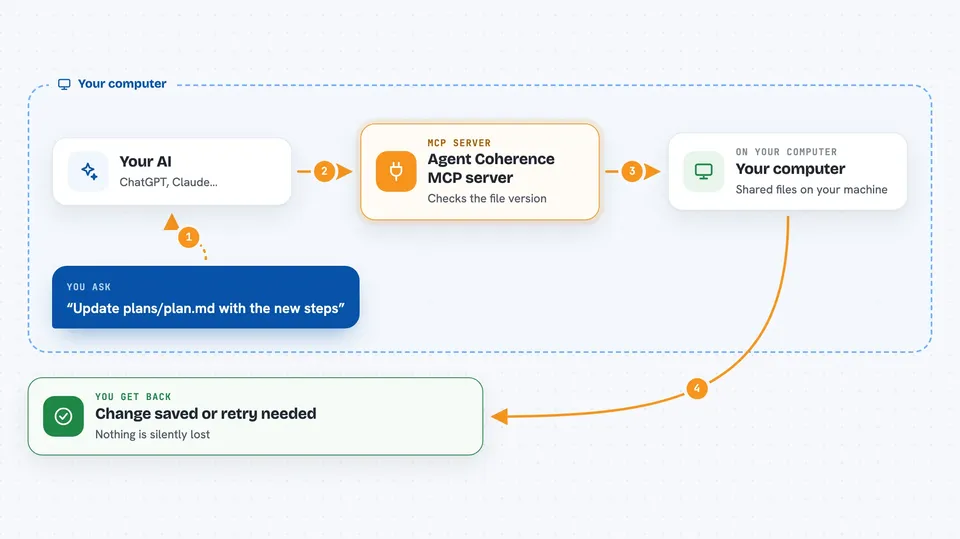
You ask your AI to update a shared file, like a plan or a memory file. Your AI asks this helper to read the file first, and the helper notes which version your AI saw. If another agent writes a newer version in the meantime, the helper blocks your AI's write and tells it the version moved. Your AI then re-reads the current version, redoes its edit, and tries again. You end up with the other agent's work intact instead of silently lost.
 Click to zoom
What you can do with it
- Read a shared file and register which version your AI is looking at
- Block a write when another agent has already changed the file
- Tell your AI to re-read and retry after a conflict
- Handle two writers at once so only one wins and the other gets a clear retry message
- Recover a file if an agent crashed while holding it
- Read several files together as one consistent snapshot
- Publish a set of files all at once so you never get a half-updated set
Try asking your AI
- “Update plans/plan.md with the new steps, but do not overwrite anything another agent changed since I last read it”
- “Two agents are editing memory.json at the same time. Make sure only one write goes through and the other gets a clear retry”
- “Read plan.md and notes.md together as one consistent snapshot, then tell me what they say”
- “Publish these three files at the same time, all or nothing”
What it gives back to you
You get a clear answer in the chat: either the change went through, or a short message saying the file moved and your AI needs to re-read and try again. It can also show you the current contents of a file or a set of files as one snapshot. Nothing is silently dropped, so what you see in the chat matches what actually happened.
Before you start
What you need
- Python 3.11 or newer
- The agent-coherence package installed with the mcp extra
- An MCP client, such as Claude Desktop or another app that supports MCP servers
Good to know
It can refuse or block writes to shared files, so your AI may need to re-read and retry before a change goes through.
Install it with your AI
Add Agent Coherence MCP server to your AI, no technical skills needed
You don't install anything by hand. You copy one prompt, paste it into an AI that can work on your computer, and it checks, installs and connects the server for you, asking you when it needs something.
Sign in to get the install prompt
Members get a ready-made prompt that lets the Claude desktop app check Agent Coherence MCP server, install it and connect it for them, step by step. You don't need any technical skills: you copy, paste and answer a few questions. Your connected AI can also find and install any of the 4,361 MCP servers here for you.
Who it's for
People running two or more AI agents that share files or memory, especially those using LangGraph, CrewAI, AutoGen, or plain shared files.





