
MCP server · Productivity · official
Box MCP server
by box · official
Let your AI search your Box files, answer questions about them, and pull out details for you.
This is a connector made by Box itself. It lets your AI assistant reach into your Box account to find files, read them, and answer questions about what is inside. It is handy if your team keeps documents, contracts, or reports in Box and you want quick answers without opening each file yourself.
What is an MCP server? The 30-second version
On its own, your AI can only chat with you. It cannot see your files or your apps. An MCP server is a small helper that gives your AI one new skill, and here that skill is a connection to Box. Once it is connected, you can ask your AI about your Box content and it can go look things up for you.
What this MCP server does
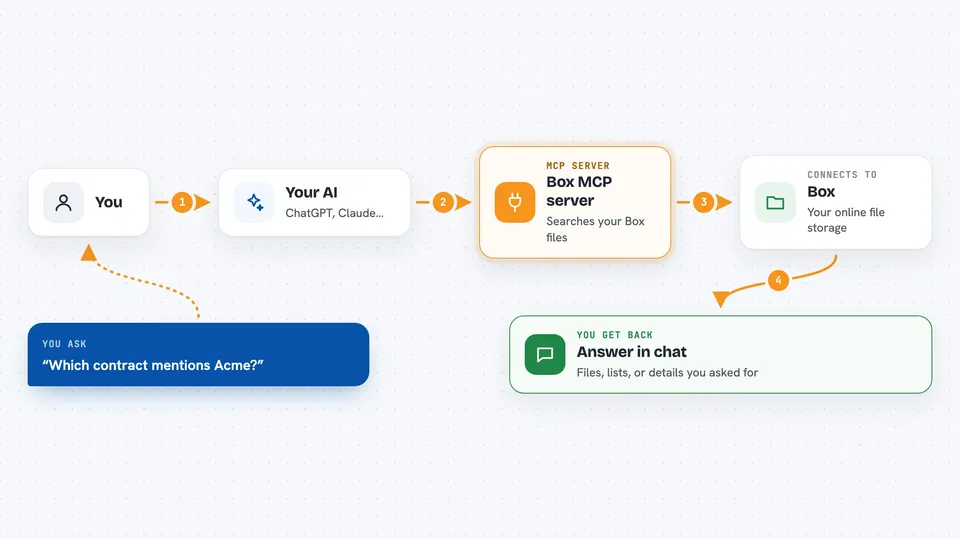
You ask your AI a question in plain words, like which contract mentions a certain client. Your AI passes that request to this Box helper. The helper talks to Box on your behalf, using the access you granted. Box sends back the matching files, folder lists, or answers, and your AI shows them to you in the chat. For some tasks, Box AI does the reading and gives back a short answer or a set of extracted details.
 Click to zoom
What you can do with it
- Search your Box files and folders by keyword
- List what is inside a folder
- Read the content of a file
- Ask questions across one or more files
- Pull out specific details like dates or names from documents
- Check which Box account you are connected as
What it gives back to you
You get answers in the chat, in normal sentences. It can also give you lists of files or folders, short summaries of documents, or specific details it pulled out, like names, dates, or amounts. When it reads a file, you usually see the relevant part quoted or summarised rather than the whole document.
Before you start
What you need
- A Box account with the content you want to reach
- Permission from your Box admin to turn on the Box MCP server, or an OAuth app set up in the Box Developer Console
- An AI client that can add a remote MCP server by URL, such as Claude or Copilot Studio
Good to know
Once connected, your AI can read whatever is in the Box folders you gave it access to, so check the permissions before you turn it on.
Install it with your AI
Add Box MCP server to your AI, no technical skills needed
You don't install anything by hand. You copy one prompt, paste it into an AI that can work on your computer, and it checks, installs and connects the server for you, asking you when it needs something.
Sign in to get the install prompt
Members get a ready-made prompt that lets the Claude desktop app check Box MCP server, install it and connect it for them, step by step. You don't need any technical skills: you copy, paste and answer a few questions. Your connected AI can also find and install any of the 4,361 MCP servers here for you.
Who it's for
Office teams who keep their documents in Box and want fast answers without digging through folders, especially in legal, finance, HR, and operations.




