MCP server · Privacy · official
Obsideo MCP server
by Regan-Milne · official
Let your AI store files in encrypted cloud storage and prove they are still there.

Obsideo is a place to keep files online. This helper lets your AI assistant save files there, get them back, and check they are still safe. It is handy if you want your AI to keep notes, backups, or working files that survive after you close the chat.
What is an MCP server? The 30-second version
On its own, your AI can only chat with you. An MCP server is a small helper program that gives your AI a new skill. This helper connects your AI to Obsideo, an online storage service. Once it is set up, your AI can save files to Obsideo, read them back, and check they are still there, all when you ask it to.
What this MCP server does
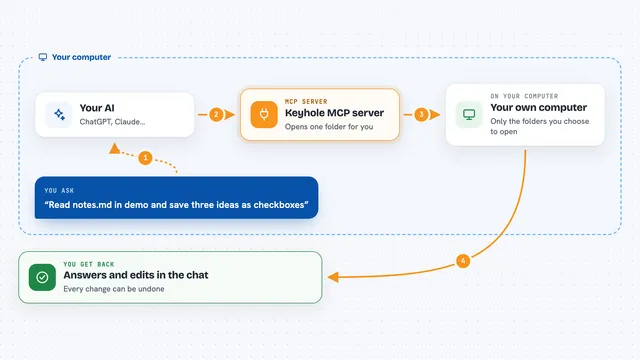
You ask your AI to save a file or some text. Your AI uses this helper to send it to Obsideo. Before it leaves your computer, the helper scrambles the file so only you can read it. Obsideo keeps copies in three places and regularly checks they are still holding your file. Later, you can ask your AI to get the file back, list what you have saved, or prove the file is still there without downloading it.
 Click to zoom
What you can do with it
- Save a file or some text to encrypted online storage
- Get a saved file back and read it
- List everything you have saved
- Delete a file you no longer need
- Check that the storage service still holds your file
- See how much space you are using
- Back up your encryption key so you do not lose access
Try asking your AI
- “Save this meeting summary to Obsideo as notes.txt”
- “List everything I have stored in Obsideo”
- “Get my notes.txt file from Obsideo”
- “Check that my backup file is still safe in Obsideo”
What it gives back to you
When you save something, your AI tells you it worked and gives you the file name. When you list, you get a simple list of your files. When you check a file, you get a short answer saying whether the storage service still holds it. When you get a file, the text or file appears in the chat.
Before you start
What you need
- The Claude desktop app or another AI tool that supports MCP
- Node.js 18 or newer if you install with npx
- Nothing else: a free trial account is created automatically the first time you save something
Good to know
If you lose your encryption key file, your saved files become unreadable forever, so back it up right after you start using this.
Install it with your AI
Add Obsideo MCP server to your AI, no technical skills needed
You don't install anything by hand. You copy one prompt, paste it into an AI that can work on your computer, and it checks, installs and connects the server for you, asking you when it needs something.
Sign in to get the install prompt
Members get a ready-made prompt that lets the Claude desktop app check Obsideo MCP server, install it and connect it for them, step by step. You don't need any technical skills: you copy, paste and answer a few questions. Your connected AI can also find and install any of the 4,361 MCP servers here for you.
Who it's for
Anyone who wants their AI to keep files or notes safely online, like writers, researchers, or people who use AI for work and want their data to last.