MCP server · Analytics
Endpoint AIops MCP server
by AIops-tools
Ask your AI to check your managed devices for login storms and config drift, and to reboot or reassign profiles with a full audit trail.
This is a helper for people who look after fleets of managed computers, like thin clients and virtual desktops. It lets your AI look up what is happening across those devices and, carefully, make changes like rebooting one or moving it to a different settings profile. It is made for IT staff who want a quick, recorded way to investigate and fix endpoint problems.
What is an MCP server? The 30-second version
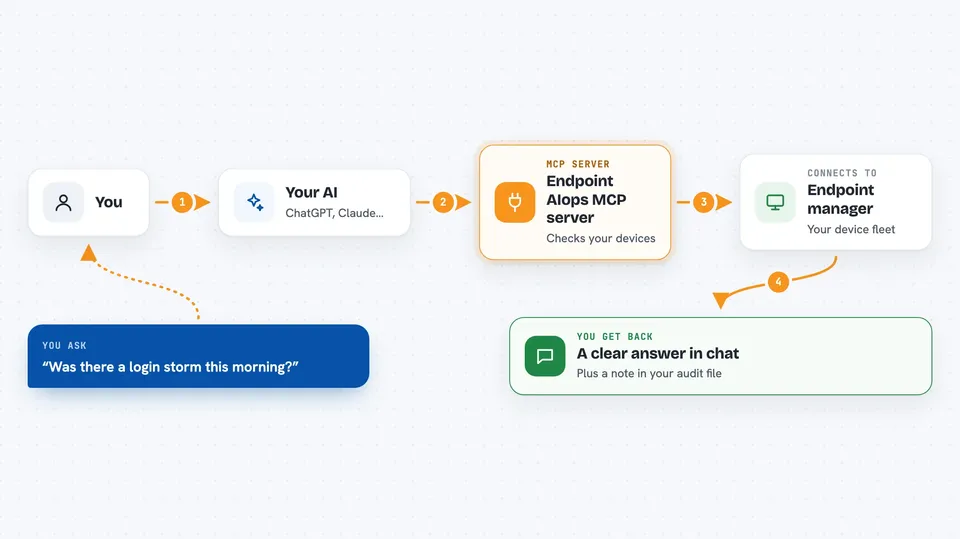
On its own, your AI can only chat with you. An MCP server is a small helper program that gives your AI a new skill or a connection to an app or service. This one connects your AI to your endpoint-management server, so it can look up devices, sessions, and patch levels, and make a few guarded changes when you ask. Think of it as giving your AI a pair of hands inside your device-management console, with a notebook that records every move.
What this MCP server does
You ask your AI a question in plain words, like which devices are slow to log in this morning. The AI passes that request to this helper. The helper talks to your endpoint-management server using its API, which is just the way one program asks another for information. It gathers the device list, session data, or patch status, does some simple analysis, and hands the result back. Your AI then shows you a clear answer in the chat, and the helper quietly writes a line in an audit file so you can see what was asked and what came back.
 Click to zoom
What you can do with it
- See a one-page overview of your endpoint fleet health
- List endpoints and look up details for a single device
- Find login storms and rank the slowest devices or users
- Report which endpoints have drifted from the fleet's usual patch or config
- Check patch status and patch compliance across devices
- Reboot a specific endpoint (with a confirmation step)
- Reassign a device to a different profile, with an undo option recorded
Try asking your AI
- “Show me an overview of my endpoint fleet right now”
- “Was there a login storm this morning, and which devices were slowest?”
- “Which endpoints have drifted from the fleet baseline on patches or config?”
- “Reboot endpoint PC-1042 and tell me what the audit log says”
What it gives back to you
You get answers in the chat: lists of devices with their names and key numbers, counts like how many have drifted or are behind on patches, and short summaries of a login storm with the slowest contributors ranked. For changes, you get a confirmation that the action was taken, plus a note that an audit row was written. If a list was cut short by a limit, it tells you so instead of quietly hiding devices.
Before you start
What you need
- Python installed on your computer (the README uses uv or pipx to install the tool)
- An account on your endpoint-management server, with an API key or username and password
- A master password you choose, used to unlock the encrypted store of that API key
- The endpoint-management server's address and which dialect (API shape) it uses
Good to know
It can reboot devices and change their profiles, so connect it with an account that only has the permissions you are comfortable giving an AI, and check the audit log after any change.
Install it with your AI
Add Endpoint AIops MCP server to your AI, no technical skills needed
You don't install anything by hand. You copy one prompt, paste it into an AI that can work on your computer, and it checks, installs and connects the server for you, asking you when it needs something.
Sign in to get the install prompt
Members get a ready-made prompt that lets the Claude desktop app check Endpoint AIops MCP server, install it and connect it for them, step by step. You don't need any technical skills: you copy, paste and answer a few questions. Your connected AI can also find and install any of the 4,361 MCP servers here for you.
Who it's for
IT administrators and helpdesk staff who manage fleets of thin clients or virtual desktops and want a quick, recorded way to investigate and fix endpoint issues.