MCP server · Customer communication
LeadAce MCP server
by aitit-inc
Let your AI research prospects, draft one email each, send from your Gmail, and track replies.
LeadAce is a helper for outbound sales. You tell it who you want to reach, and it studies each company's website, writes one email per prospect, and sends it from your own Gmail after you approve. It is handy if you do sales outreach by hand and want the boring parts handled for you.
What is an MCP server? The 30-second version
On its own, your AI can only chat with you. An MCP server is a small helper program that gives your AI a new skill or a connection to an app. This one connects your AI to LeadAce, a sales tool that keeps your prospect lists and outreach history in the cloud. Once it is connected, your AI can look up prospects, write emails, send them, and check replies for you when you ask.
What this MCP server does
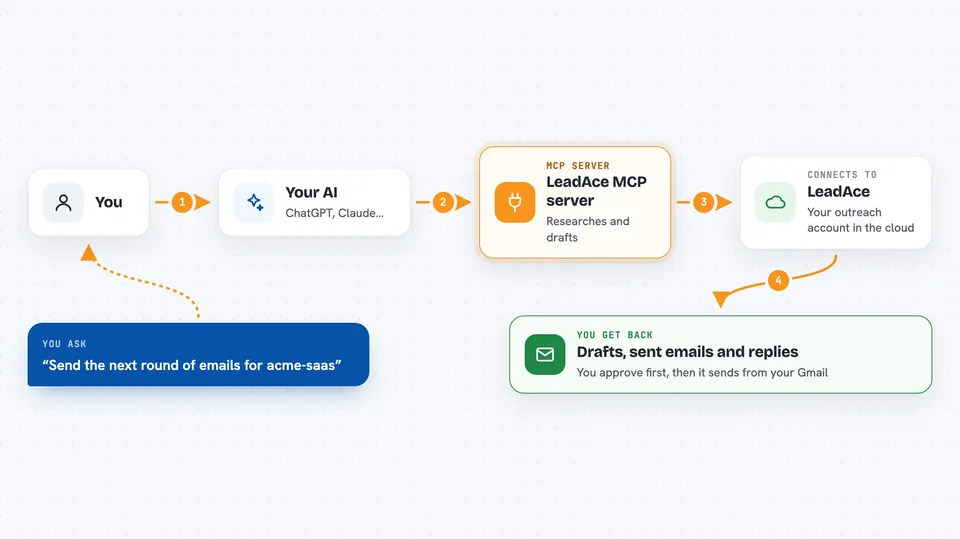
You ask your AI to work on one of your LeadAce projects, for example to build a list of prospects or send the next round of emails. The AI uses this helper, which talks to your LeadAce account in the cloud. LeadAce researches each prospect's website, writes a draft email for each one, and waits for your approval. When you approve, the emails go out from your own Gmail. Later, LeadAce checks your inbox for replies and notes what happened.
 Click to zoom
What you can do with it
- Build a prospect list by searching the web
- Import prospects from a CSV, Excel, or SQLite file
- Write and send one email per prospect from your Gmail
- Check your inbox and collect replies
- Review rejections and suggest what to change next time
- Run the whole daily cycle in one command
- Set up a daily schedule so it runs without you
Try asking your AI
- “Build me a prospect list for my project acme-saas”
- “Send the next round of outbound emails for acme-saas”
- “Check responses for acme-saas and tell me what came back”
- “Run the daily cycle for acme-saas with 20 new prospects”
What it gives back to you
You get back plain answers in the chat: lists of prospects with a short note on each, drafts of the emails it wants to send, and a summary of replies it found in your inbox. It also tells you what it learned from rejections, like which industries said no or who asked to be contacted later. Everything is stored in your LeadAce account, so you can also review it in the web app.
Before you start
What you need
- A LeadAce account (free tier available, no card needed)
- A connected Gmail account so it can send and read replies
- Claude Cowork or Claude Code on a paid Anthropic plan
- A browser only if you want it to fill in contact forms or send social messages
Good to know
It sends real emails from your own Gmail and can permanently delete a project and all its data, so approve drafts carefully and be sure before you delete anything.
Install it with your AI
Add LeadAce MCP server to your AI, no technical skills needed
You don't install anything by hand. You copy one prompt, paste it into an AI that can work on your computer, and it checks, installs and connects the server for you, asking you when it needs something.
Sign in to get the install prompt
Members get a ready-made prompt that lets the Claude desktop app check LeadAce MCP server, install it and connect it for them, step by step. You don't need any technical skills: you copy, paste and answer a few questions. Your connected AI can also find and install any of the 4,361 MCP servers here for you.
Who it's for
Salespeople, founders, and small teams who do outbound email by hand and want help researching and writing each message.