MCP server · Customer communication · official
Vruum MCP server
by vruum-gtm · official
Lets your AI research prospects, draft outreach, track deals, and check revenue inside your Vruum account.
Vruum is an AI revenue platform for sales teams. This MCP server is the official way to connect your AI assistant to your Vruum account. It is handy if you work in sales, marketing, or revenue operations and want your AI to help with prospecting, outreach, and pipeline work.
What is an MCP server? The 30-second version
On its own, your AI can only chat. An MCP server is a small helper program that gives your AI a new skill or a connection to an app. This one connects your AI to Vruum, so it can look things up and do things in your Vruum account when you ask. You stay in control: your AI asks Vruum for something, and Vruum checks your permissions before answering.
What this MCP server does
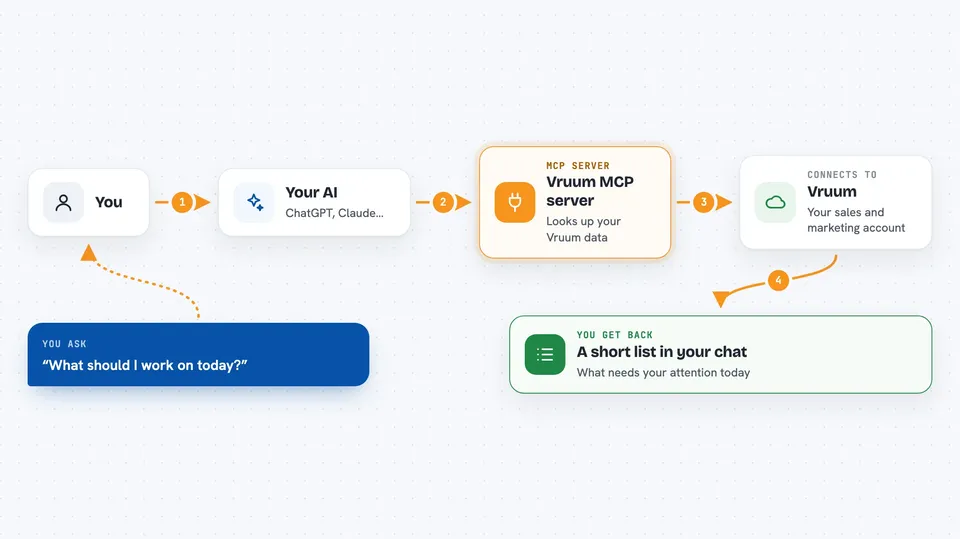
You ask your AI a question, like what to work on today or which deals are at risk. Your AI uses this helper to talk to Vruum. Vruum looks up the answer in your account and sends it back. Your AI shows you the result in the chat, often as a list or a short summary. For things like outreach drafts, your AI writes the text and Vruum handles the sending after you approve.
 Click to zoom
What you can do with it
- Get a daily briefing of what needs your attention
- Research a company and check if it fits your ideal customer profile
- Review and approve outreach drafts before they go out
- Find a warm introduction path to a person
- See which campaigns are getting replies and meetings
- Inspect your pipeline to spot deals at risk
- Draft and schedule LinkedIn posts with your approval
Try asking your AI
- “What should I work on today?”
- “Review my outreach drafts”
- “Research Acme Corp and tell me if they fit”
- “What's at risk in my pipeline?”
What it gives back to you
You get answers in the chat, usually as a list or a short summary. For example, a daily briefing shows pending approvals, new replies, and stalled deals. Research comes back with findings about a company and a fit score with reasons. When you approve outreach, Vruum schedules and sends it, and you can see the status later.
Before you start
What you need
- A Vruum account
- A personal access token from Vruum (Settings, then API tokens)
- Node.js 20 or newer if you use the local bridge
Good to know
Some tools can send outreach, spend money, or change your data, so review what your AI is about to do before you approve it.
Install it with your AI
Add Vruum MCP server to your AI, no technical skills needed
You don't install anything by hand. You copy one prompt, paste it into an AI that can work on your computer, and it checks, installs and connects the server for you, asking you when it needs something.
Sign in to get the install prompt
Members get a ready-made prompt that lets the Claude desktop app check Vruum MCP server, install it and connect it for them, step by step. You don't need any technical skills: you copy, paste and answer a few questions. Your connected AI can also find and install any of the 4,361 MCP servers here for you.
Who it's for
Sales, marketing, and revenue operations people who use Vruum and want their AI assistant to help with prospecting, outreach, and pipeline work.