MCP server · Customer communication · official
HeyLead LinkedIn outreach MCP server
by D4umak · official
Let your AI find LinkedIn leads, write messages in your voice, follow up, and handle replies for you.
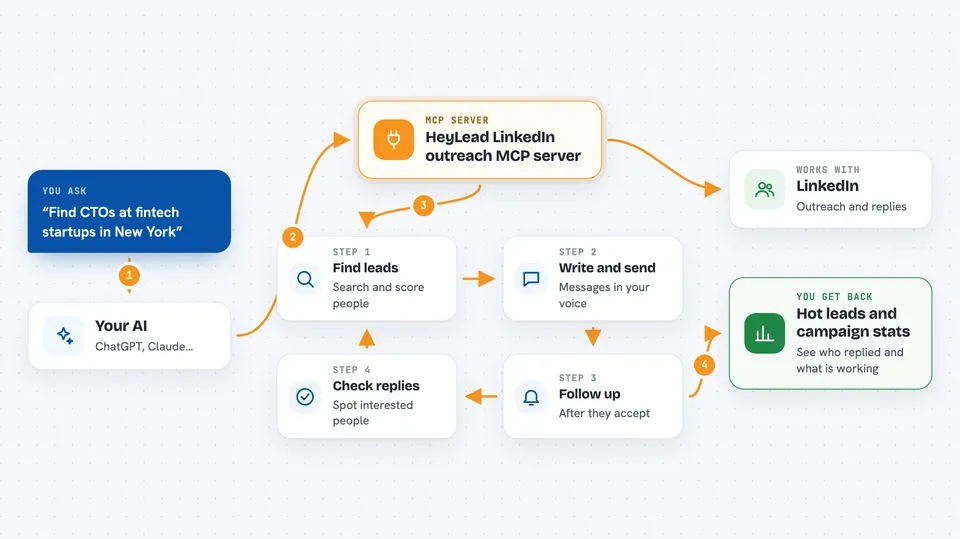
HeyLead is a helper that connects your AI to LinkedIn so it can do outreach for you. You tell your AI what you want, like finding fintech CTOs in New York, and it searches LinkedIn, writes messages that sound like you, and follows up. It is handy for sales people, recruiters, job seekers, and anyone who needs to reach out to a lot of people on LinkedIn.
What is an MCP server? The 30-second version
On its own, your AI can only chat with you. An MCP server is a small helper program that gives your AI a new skill or a connection to an app or service. This one connects your AI to LinkedIn and to HeyLead's outreach engine. So when you ask your AI to find leads or send a message, it can actually do that on LinkedIn for you.
What this MCP server does
You ask your AI something like find me CTOs at fintech startups in New York. Your AI uses this helper, which searches LinkedIn and scores people by how well they fit. The helper then writes a message in your voice, based on your own LinkedIn posts, and sends it at a human pace. It can also follow up automatically and check replies, telling you which ones are positive. Everything is created as a draft first and only starts sending when you launch it.
 Click to zoom
What you can do with it
- Find people on LinkedIn who match your ideal customer profile
- Write and send personalized messages that sound like you
- Follow up automatically after people accept your connection
- Check replies and spot the ones that are interested
- Engage with prospects' posts before you reach out
- Track which campaigns are working and which leads are hot
- Book meetings on your Google Calendar when someone agrees
Try asking your AI
- “Find me CTOs at fintech startups in New York”
- “Send outreach to the campaign”
- “Check my replies”
- “How's my outreach doing?”
What it gives back to you
You get back lists of people who match your search, with notes on how well they fit. You see summaries of your campaigns, like how many messages were sent and how many replies came in. When someone replies, your AI tells you the sentiment and flags the hot leads. You can also see your dashboard with stats and account health.
Before you start
What you need
- A HeyLead account (you can sign up on their website)
- A LinkedIn account connected to HeyLead
- An MCP-compatible AI editor like Cursor or Claude Code
- For self-hosting: a Unipile account and an LLM API key (like a free Gemini key)
Good to know
This tool can send messages and make changes on your LinkedIn account, so make sure you review what it plans to send and use the approval mode if you want to check each message first.
Install it with your AI
Add HeyLead LinkedIn outreach MCP server to your AI, no technical skills needed
You don't install anything by hand. You copy one prompt, paste it into an AI that can work on your computer, and it checks, installs and connects the server for you, asking you when it needs something.
Sign in to get the install prompt
Members get a ready-made prompt that lets the Claude desktop app check HeyLead LinkedIn outreach MCP server, install it and connect it for them, step by step. You don't need any technical skills: you copy, paste and answer a few questions. Your connected AI can also find and install any of the 4,361 MCP servers here for you.
Who it's for
Sales people, recruiters, job seekers, founders looking for partners or investors, and anyone who does a lot of LinkedIn outreach.