MCP server · Customer communication
CallRail MCP server
by pghdma
Lets your AI read and update your CallRail calls, forms, texts, tags, and billing details for you.
This is a small helper program that connects your AI assistant to your CallRail account. CallRail is the service that tracks phone calls, form fills, and texts from your marketing. If you run an agency or manage several clients, this lets you ask your AI questions about all of that without clicking around the CallRail website.
What is an MCP server? The 30-second version
On its own, your AI can only chat with you. It cannot see your CallRail account. An MCP server is a small helper program that gives your AI a new skill, and this one connects it to CallRail. Once it is set up, you can ask your AI about your calls and forms, and it will go look things up in CallRail for you.
What this MCP server does
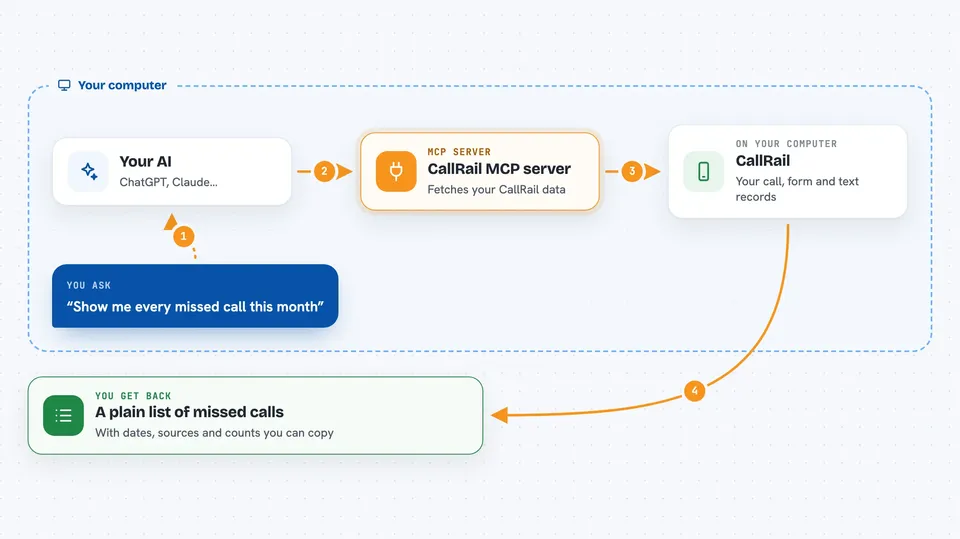
You ask your AI a question about your calls, forms, or texts. The AI passes that request to this helper program running on your computer. The helper talks to CallRail using your API key and brings the answer back. Then the AI explains it to you in plain words in the chat. It can also make changes, like adding a tag or a note to a call, if you ask it to.
 Click to zoom
What you can do with it
- List your CallRail accounts, companies, and tracking numbers
- Pull calls for a client by date, source, or missed status
- Get a transcript or recording link for a specific call
- See a person's full history of calls, forms, and texts
- Add tags or notes to calls and SMS threads
- Break down your CallRail bill by client
- Check why a call did not count as a Google Ads conversion
Try asking your AI
- “Pull last week's calls for Alan Construction, grouped by source”
- “Show me every missed call this month”
- “Why is my CallRail bill $174? Break it down by client”
- “Show me everything this lead has ever done with us”
What it gives back to you
You get answers in the chat, like lists of calls with dates and sources, counts and totals, or a per-client cost breakdown. For a single call, it can return the transcript text, the recording link, or the page views the visitor saw. When you ask it to change something, it tells you what it updated. Everything shows up as normal text you can read and copy.
Before you start
What you need
- A CallRail account
- An API key from CallRail (Settings > API Keys; you need Account Admin permission to make one)
- Python installed on your computer, plus pipx or pip to install the helper
Good to know
It can change or delete things in your CallRail account, and some actions like creating a tracker or placing an outbound call cost money or dial real phones, so check before you confirm.
Install it with your AI
Add CallRail MCP server to your AI, no technical skills needed
You don't install anything by hand. You copy one prompt, paste it into an AI that can work on your computer, and it checks, installs and connects the server for you, asking you when it needs something.
Sign in to get the install prompt
Members get a ready-made prompt that lets the Claude desktop app check CallRail MCP server, install it and connect it for them, step by step. You don't need any technical skills: you copy, paste and answer a few questions. Your connected AI can also find and install any of the 4,361 MCP servers here for you.
Who it's for
Marketing agencies and in-house marketers who track calls and forms in CallRail and want quick answers without clicking through the dashboard.