
MCP server · Developer tools
CodeLattice MCP server
by aiulms
Lets your AI read your local code and answer questions about structure, calls, and change impact.
CodeLattice is a helper that reads your project's code and builds a map of how everything connects. It runs on your own computer and works with AI assistants like Claude Desktop or Codex. It is handy if you just joined a project, are maintaining old code, or want a second opinion before you change something.
What is an MCP server? The 30-second version
On its own, your AI can only chat with you. An MCP server is a small helper program that gives your AI a new skill or a connection to something. This one connects your AI to CodeLattice, which reads your local code and builds a map of it. So when you ask about your project, the AI can look things up in that map instead of guessing.
What this MCP server does
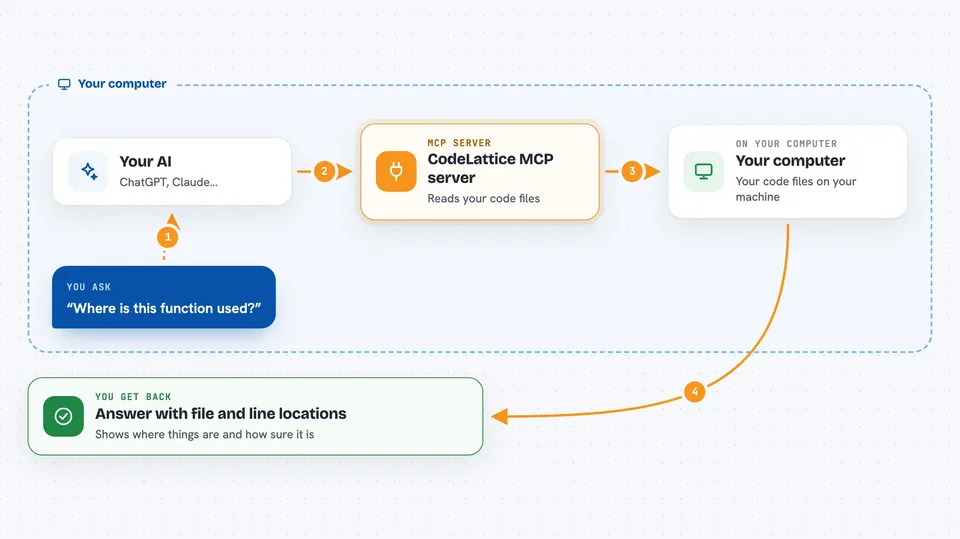
You ask your AI a question about your code, like where a function is used. The AI passes that question to CodeLattice through the MCP connection. CodeLattice reads your project files, finds the symbols, calls, and imports, and puts together an answer with source locations and confidence levels. The AI then explains that answer back to you in plain words. Nothing is uploaded, and your code is never run.
 Click to zoom
What you can do with it
- Get an overview of a project, including entry points and main modules
- Find where a function or symbol is defined and who calls it
- Check what might break before you change a function
- Review your current changes for missing docs, tests, or API updates
- See how packages and workspaces depend on each other
- Inspect code quality issues like duplicate nodes or dangling links
Try asking your AI
- “Use CodeLattice to give me an overview of this project, list the entry points and main modules.”
- “Before I change this function, check its callers and possible impact.”
- “Review my current changes and list docs, tests, and public APIs I may need to update.”
- “Which files depend on this package, and how strong is that evidence?”
What it gives back to you
You get back structured answers: lists of symbols with file and line locations, call chains, dependency maps, and change review notes. Each result comes with a confidence level and the reason it was matched, so you can check the source yourself. In the chat, this usually shows up as a short summary plus a list of files and lines to look at. It does not change your code; it only reads and reports.
Before you start
What you need
- A local copy of your project on the same computer
- Git and Rust/Cargo if you build from source, or a released binary for macOS Apple Silicon
- An MCP client like Claude Desktop, Codex, or OpenCode
- Python 3 if you want to run the self-check script
Good to know
It only reads your code and never runs it, but its map is based on static analysis, so dynamic behavior and some edge cases may be missing; always double-check results against the real source before acting on them.
Install it with your AI
Add CodeLattice MCP server to your AI, no technical skills needed
You don't install anything by hand. You copy one prompt, paste it into an AI that can work on your computer, and it checks, installs and connects the server for you, asking you when it needs something.
Sign in to get the install prompt
Members get a ready-made prompt that lets the Claude desktop app check CodeLattice MCP server, install it and connect it for them, step by step. You don't need any technical skills: you copy, paste and answer a few questions. Your connected AI can also find and install any of the 4,609 MCP servers here for you.
Who it's for
Developers, tech leads, and anyone who has to understand or safely change a codebase they did not write.




