
MCP server · Analytics
DigestSEO GEO tracker MCP server
by AKzar1el
Check how often your brand shows up in answers from ChatGPT, Claude, Gemini, Perplexity and Google AI Overviews.
This is a helper that lets your AI check how visible your brand is inside AI answers. You give it a brand name or a question, and it asks several AI engines what they say. It is handy for marketers, SEO people and anyone who wants to know if AI tools mention their company.
What is an MCP server? The 30-second version
On its own, your AI can only chat with you using what it already knows. An MCP server is a small helper program that gives your AI a new skill or a connection to a service. This helper connects your AI to several AI answer engines and search data, so it can run visibility checks for you. You ask in plain words, and the helper does the looking up behind the scenes.
What this MCP server does
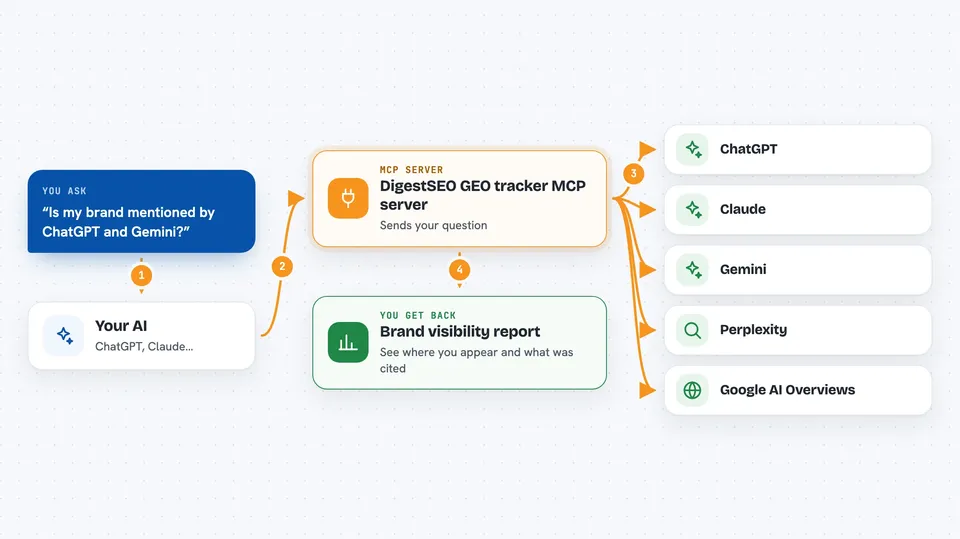
You ask your AI something like whether your brand is mentioned by ChatGPT or Gemini. Your AI passes that request to this helper program running on your computer. The helper sends your question to the AI engines you have keys for, and to a search data service if you added that key. It collects the answers, notes whether your brand appears and in what position, then hands the results back to your AI. Your AI then explains the findings to you in the chat.
 Click to zoom
What you can do with it
- Check if your brand is mentioned in answers from ChatGPT, Claude, Gemini, Perplexity and Google AI Overviews
- Compare how visible your brand is across several AI engines at once
- See which competitors get mentioned when people ask about your topic
- Track whether your brand shows up for specific questions over time
- Find out which sources or pages the AI engines cite when they answer
- Run a visibility check for a list of questions or keywords
What it gives back to you
You get back a summary of what each AI engine said and whether your brand appeared. It often includes the exact answer text, the position of your brand if it was mentioned, and which sources were cited. Your AI then presents this as a short report or a list in the chat. You can ask follow-up questions about the results.
Before you start
What you need
- Node.js version 22.13 or newer installed on your computer
- At least one API key from an AI provider such as OpenAI, Anthropic, Google Gemini, Perplexity or xAI (these are like passwords for apps; the provider gives you one when you sign up)
- Optional: a SerpApi key if you want Google AI Overviews data (SerpApi is a paid service that returns search results)
- An MCP-capable AI app such as Claude Desktop, ChatGPT with a remote setup, or a code editor that supports MCP
Good to know
Each check sends your question to the AI providers you connected, and those providers may charge you per request, so keep an eye on your usage.
Install it with your AI
Add DigestSEO GEO tracker MCP server to your AI, no technical skills needed
You don't install anything by hand. You copy one prompt, paste it into an AI that can work on your computer, and it checks, installs and connects the server for you, asking you when it needs something.
Sign in to get the install prompt
Members get a ready-made prompt that lets the Claude desktop app check DigestSEO GEO tracker MCP server, install it and connect it for them, step by step. You don't need any technical skills: you copy, paste and answer a few questions. Your connected AI can also find and install any of the 4,609 MCP servers here for you.
Who it's for
Marketers, SEO specialists, brand managers and small business owners who want to know how often AI tools mention their brand.




