
MCP server · Developer tools
FTP Deploy MCP server
by alebgl77
Let your AI upload, download, and deploy files to your own FTP, FTPS, or SFTP servers.
This is a helper that lets your AI assistant work with files on your own FTP, FTPS, or SFTP servers. You set up your server details once, and then you can ask your AI to list files, read them, upload new ones, or push a whole folder to your site. It is handy if you manage a website or move files to a server and want to do it by just asking, instead of clicking around in a file transfer program.
What is an MCP server? The 30-second version
On its own, your AI can only chat. It cannot reach out to your FTP server or touch your files. An MCP server is a small helper program that runs on your computer and gives your AI a new skill. This one gives your AI a connection to your FTP, FTPS, or SFTP servers, so when you ask it to list files or upload something, it can actually do it for you.
What this MCP server does
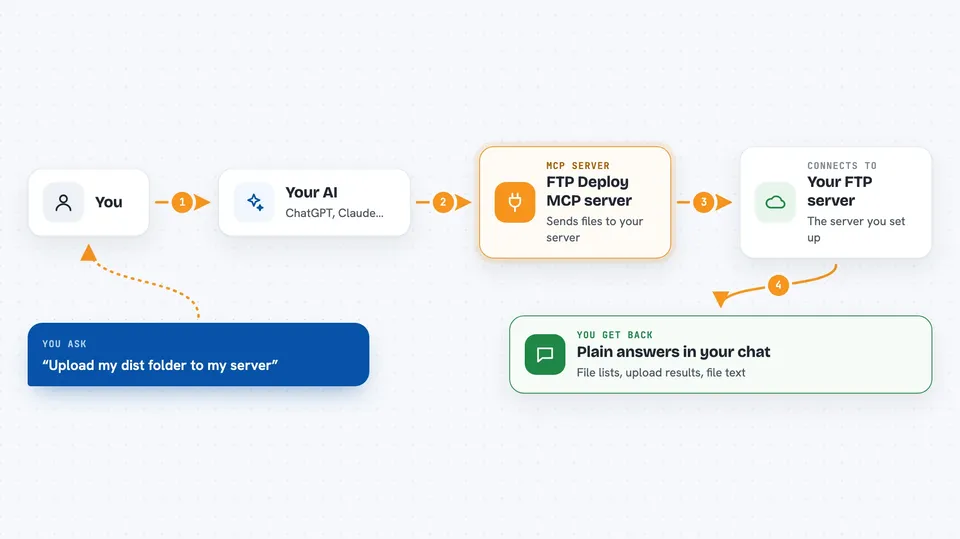
You ask your AI something like list the files on my server or upload my dist folder. Your AI passes that request to this helper program. The helper connects to the server you configured, using the details and credentials you set up. It performs the action, like listing a folder or copying files. Then it sends the result back to your AI, which shows it to you in the chat.
 Click to zoom
What you can do with it
- List the files and folders on your server
- Read a text file from the server
- Upload a single file from your computer to the server
- Deploy a whole folder to the server, with a dry run first if you want
- Download a file from the server to your computer
- Create a new folder on the server
- Rename or delete files and folders on the server
Try asking your AI
- “List the files in the root folder on my prod server”
- “Upload my local dist folder to the public_html folder on my server”
- “Do a dry run of deploying my site folder so I can see what would change”
- “Download the config file from my server so I can look at it”
What it gives back to you
You get back plain answers in the chat. For a list request, you see the file names and details. For a deploy, you see which files were uploaded and whether it was a dry run. For a read request, you see the text of the file. If something goes wrong, you get a clear error message.
Before you start
What you need
- A computer with Node.js version 22 or 24 installed
- The details of your FTP, FTPS, or SFTP server (host, username, password or key)
- A configuration file on your computer with your server details
- An AI app that supports MCP servers, like Claude Desktop or Cursor
Good to know
This tool can change or delete files on your server, so be careful with what you ask it to do, especially on live sites.
Install it with your AI
Add FTP Deploy MCP server to your AI, no technical skills needed
You don't install anything by hand. You copy one prompt, paste it into an AI that can work on your computer, and it checks, installs and connects the server for you, asking you when it needs something.
Sign in to get the install prompt
Members get a ready-made prompt that lets the Claude desktop app check FTP Deploy MCP server, install it and connect it for them, step by step. You don't need any technical skills: you copy, paste and answer a few questions. Your connected AI can also find and install any of the 4,361 MCP servers here for you.
Who it's for
People who manage websites or move files to servers and want to do it by asking their AI instead of using a separate file transfer program.


