
MCP server · Developer tools
hledit MCP server
by dabito
Lets your AI edit files by line numbers it just read, and blocks edits when the file has changed underneath.
This is a small helper that lets your AI assistant edit files in a folder on your computer, but in a careful way. Instead of retyping chunks of old text and hoping it matches, the AI points at exact lines it read a moment ago. It is handy for anyone who asks an AI to change code or text files and worries about it editing the wrong spot.
What is an MCP server? The 30-second version
On its own, your AI can only chat with you. An MCP server is a small helper program that gives your AI a new skill, in this case the ability to read and change files in a folder you choose. When you ask for a change, your AI passes the request to this helper, and the helper does the actual file work on your machine. You set it up once, and after that your AI just uses it when needed.
What this MCP server does
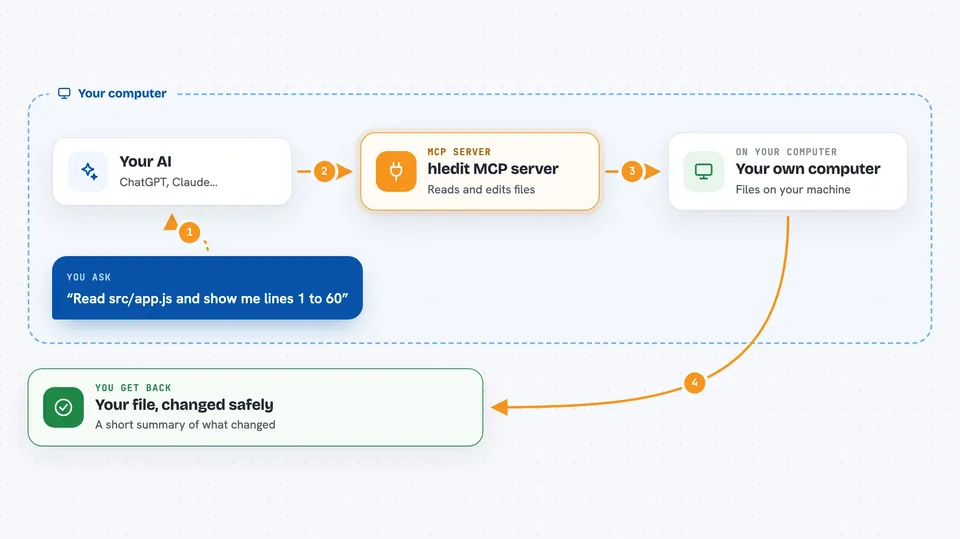
You ask your AI to look at a file or change something in it. The AI uses this helper to read the file, and the helper shows each line with a short tag next to it, like 6#M9A. When the AI wants to change a line, it points at that tag instead of retyping the old text. Before writing anything, the helper checks that the line still matches what was read. If the file changed in the meantime, the edit is refused and the AI is told to read again, so nothing gets silently overwritten in the wrong place.
 Click to zoom
What you can do with it
- Read a file and see each line with a short tag next to it
- Change one specific line by pointing at its tag
- Insert new lines before or after a tagged line
- Delete a line or a range of lines
- Make several changes to one file in a single request
- Search inside a file for a word and see a few lines around each match
- Get a short summary of what changed, including how many lines were added or removed
Try asking your AI
- “Read src/app.js and show me lines 1 to 60 with their tags”
- “Change the line tagged 12#NKT to say const ok = true;”
- “Delete lines 40#AAA through 44#BBB in notes.md”
- “Find every place validateToken appears in src/auth.ts and show two lines around each one”
What it gives back to you
After reading, you get the file's lines back in the chat, each one with a short tag in front. After an edit or a batch of edits, you get a short summary of what was changed, and how many lines were added or removed. If a change is refused because the file moved on, you get a short note saying the tag is stale and that a fresh read is needed. You can also turn on an optional diff view if you want to see the exact before and after.
Before you start
What you need
- Node.js 18 or newer on your computer
- Go 1.21 or newer, to install the hledit command it relies on (or a ready-made hledit program already on your system)
- An AI app that speaks MCP, such as Claude Desktop, Claude Code, or Cursor
- The folder you want the AI to be allowed to edit
Good to know
It can change or delete lines in files inside the folder you point it at, so set HLEDIT_CWD to a workspace you are comfortable having edited, and keep backups or version control.
Install it with your AI
Add hledit MCP server to your AI, no technical skills needed
You don't install anything by hand. You copy one prompt, paste it into an AI that can work on your computer, and it checks, installs and connects the server for you, asking you when it needs something.
Sign in to get the install prompt
Members get a ready-made prompt that lets the Claude desktop app check hledit MCP server, install it and connect it for them, step by step. You don't need any technical skills: you copy, paste and answer a few questions. Your connected AI can also find and install any of the 4,361 MCP servers here for you.
Who it's for
People who ask an AI to edit code or text files locally and want a safety net against edits landing on the wrong line.


