
MCP server · Developer tools
transfa MCP server
by colapsis
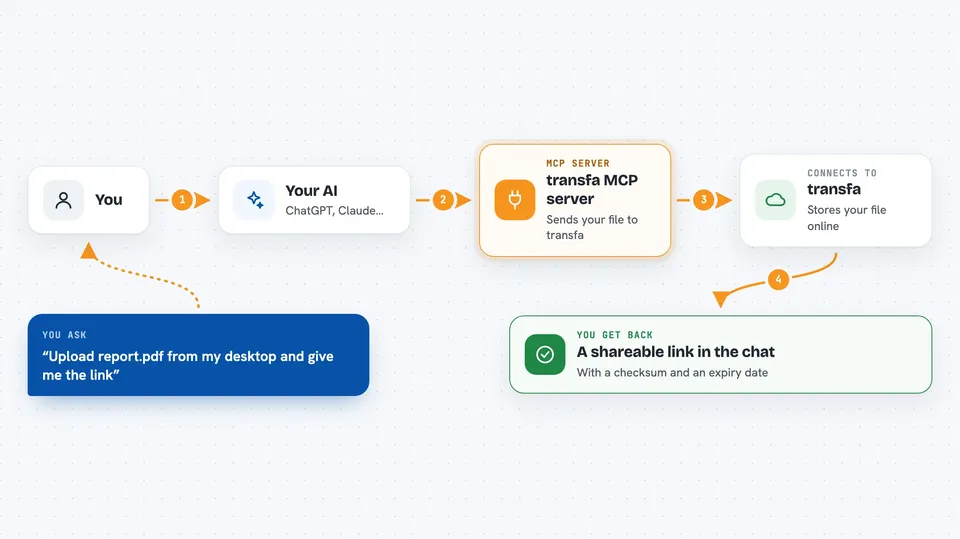
Lets your AI upload a file and hand you back a shareable link, with a checksum and an expiry date.
transfa is a file sharing service made for the command line and for AI agents. It lets you upload a file and get back a link you can share, with no account needed to start. It is handy if you often need to send a file to someone and do not want to fuss with a web page.
What is an MCP server? The 30-second version
On its own, your AI can only chat with you. An MCP server is a small helper program that gives your AI a new skill or a connection to an app or service. This one connects your AI to transfa, a file sharing service, so the AI can upload files, check on them, list them, and delete them for you when you ask.
What this MCP server does
You tell your AI to upload a file that is sitting on your computer. The AI passes that request to this helper, and the helper sends the file to transfa. transfa stores it and sends back a link, a checksum, and an expiry date. Your AI then shows you the link in the chat so you can copy it and share it.
 Click to zoom
What you can do with it
- Upload a file and get a shareable link
- Check the details of an upload, like its size, checksum, and expiry
- List your recent uploads
- Delete an upload you no longer need
- Group files from the same job so you can find them later
- Share a file link with another person or another AI
Try asking your AI
- “Upload the report.pdf on my desktop and give me the link”
- “What is the checksum and expiry date for upload xK9mRp”
- “List my recent uploads”
- “Delete the upload called old-draft.zip”
What it gives back to you
You get back a short answer in the chat, usually with a link you can click or copy. For an upload, it also shows the file name, its size, a checksum, and when the link expires. For a list, you get a short rundown of your recent uploads. For a delete, it just confirms the file is gone.
Before you start
What you need
- The Claude desktop app or another app that supports MCP servers
- Node.js installed on your computer (the helper runs through npx)
- An optional transfa API key if you want bigger files and longer expiry times
Good to know
Deleting an upload removes it for good, so make sure you no longer need the file or the link before you ask your AI to delete it.
Install it with your AI
Add transfa MCP server to your AI, no technical skills needed
You don't install anything by hand. You copy one prompt, paste it into an AI that can work on your computer, and it checks, installs and connects the server for you, asking you when it needs something.
Sign in to get the install prompt
Members get a ready-made prompt that lets the Claude desktop app check transfa MCP server, install it and connect it for them, step by step. You don't need any technical skills: you copy, paste and answer a few questions. Your connected AI can also find and install any of the 4,361 MCP servers here for you.
Who it's for
People who move files around a lot, like developers, testers, and anyone who needs to send a file quickly without signing up for anything.


