
MCP server · Developer tools
Large File MCP server
by willianpinho
Lets your AI read, search, and navigate huge files without crashing or running out of memory.
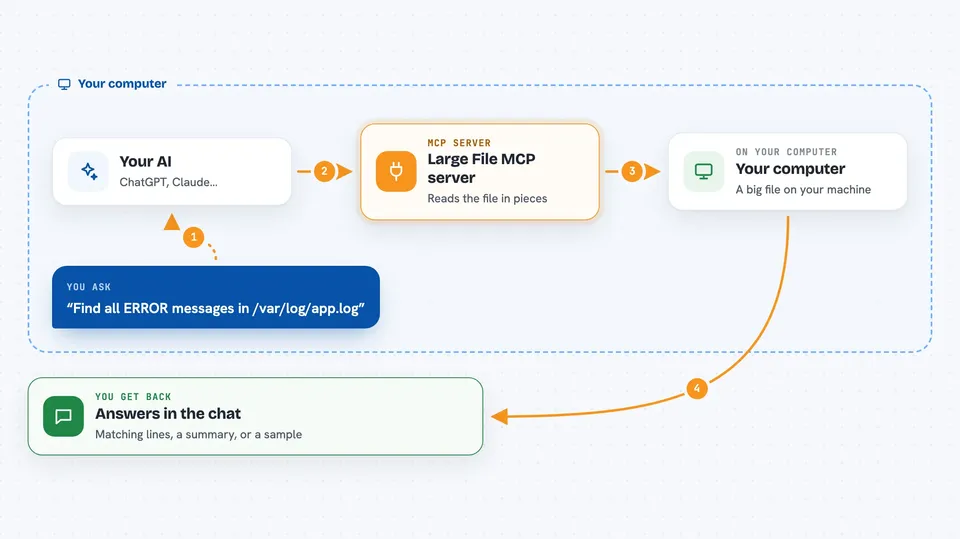
This is a small helper that lets your AI work with very large files, like multi-gigabyte log files or big data exports. Normally your AI can only see a little bit of a file at a time, and a giant file will not fit. This helper breaks the file into pieces and lets the AI look at just the parts you care about.
What is an MCP server? The 30-second version
On its own, your AI can only chat with you. An MCP server is a small helper program you connect to your AI, and it gives the AI a new skill. This one gives your AI the skill of handling large files on your computer. Once it is connected, you can ask your AI about a big file, and it will use this helper to open it, search it, or read a section for you.
What this MCP server does
You ask your AI something about a big file, like finding errors in a log or reading a certain line. The AI passes your request to this helper. The helper opens the file on your computer, reads it in small pieces instead of all at once, and finds what you asked for. Then it sends the answer back to the AI, and the AI explains it to you in the chat. It never loads the whole file into memory, so even very large files are fine.
 Click to zoom
What you can do with it
- Read a specific chunk of a huge file
- Search for a word or pattern inside a large file
- Jump to a certain line and see the lines around it
- Get a summary of a file, like its size and line count
- Stream a very large file in pieces
- See the structure of a CSV or JSON file before reading it all
Try asking your AI
- “Find all ERROR messages in /var/log/app.log”
- “Show me line 1234 of /code/app.ts with some context around it”
- “What is the structure of /data/sales.csv?”
- “Read the first chunk of /var/log/system.log”
What it gives back to you
You get answers in the chat, like a list of matching lines with a few lines around each one, or a summary of the file with its size and line count. If you ask for a specific line, you see that line plus the lines before and after it. For a CSV or JSON file, you get a quick overview and a few sample rows or lines. Nothing is changed in your files; it only reads them.
Before you start
What you need
- Node.js installed on your computer (the helper runs on it)
- The Claude desktop app or Claude Code CLI, or another AI app that supports MCP servers
- The full path to the file you want to look at, like /var/log/app.log
Good to know
This helper only reads files, so it will not change or delete anything, but make sure you are comfortable letting your AI see the contents of the files you point it at.
Install it with your AI
Add Large File MCP server to your AI, no technical skills needed
You don't install anything by hand. You copy one prompt, paste it into an AI that can work on your computer, and it checks, installs and connects the server for you, asking you when it needs something.
Sign in to get the install prompt
Members get a ready-made prompt that lets the Claude desktop app check Large File MCP server, install it and connect it for them, step by step. You don't need any technical skills: you copy, paste and answer a few questions. Your connected AI can also find and install any of the 4,361 MCP servers here for you.
Who it's for
Anyone who deals with big files, like developers reading logs or code, data analysts looking at large CSV or JSON exports, and system administrators checking system logs.


