
MCP server · Developer tools
IPFS MCP server
by alexbakers
Lets your AI upload files to IPFS storage and manage your storacha.network spaces for you.
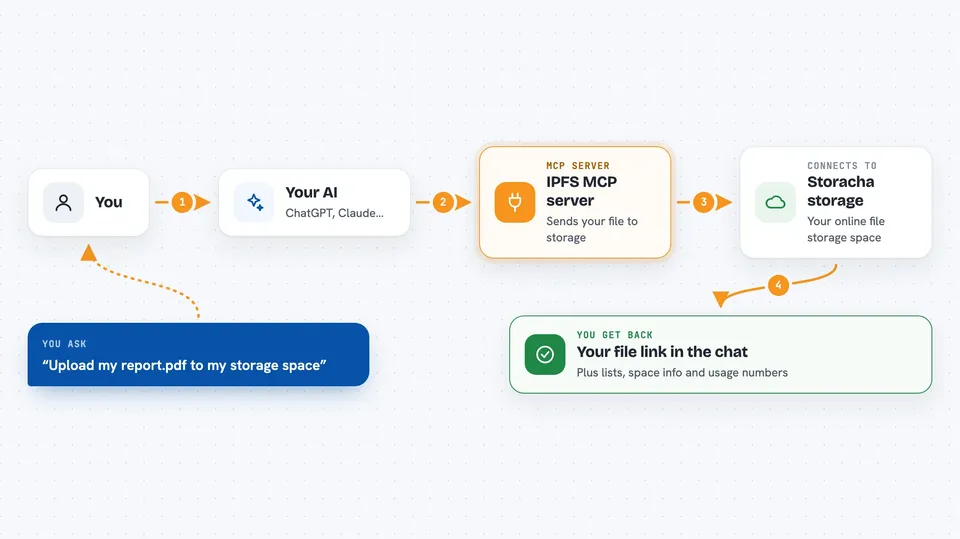
This is a helper that connects your AI assistant to IPFS storage through storacha.network. IPFS is a way to store files online where each file gets its own link, and storacha is a service that keeps those files for you. It is handy if you already use storacha and want to upload, list, or share files without typing commands yourself.
What is an MCP server? The 30-second version
On its own, your AI can only chat. An MCP server is a small helper program that gives your AI a new skill or a connection to an app. This one connects your AI to storacha.network, a service for storing files on IPFS. Once it is set up, you can just ask your AI to upload a file or list what you have stored, and it will do it for you.
What this MCP server does
You ask your AI something like upload this file or show my stored files. The AI uses this helper, which runs the w3 command-line tool behind the scenes. The helper talks to storacha.network and carries out the task, like uploading a file or listing your spaces. Then it brings the result back to your chat, so you see the answer or the new link right there.
 Click to zoom
What you can do with it
- Upload a file to your storacha space
- List the files you have stored
- Show information about your spaces
- Create a shareable link for a file
- Remove a file from storage
- Check your storage plan and usage
- Manage keys and delegations
Try asking your AI
- “Upload my report.pdf to storacha”
- “List all the files in my current space”
- “Give me a shareable link for that file”
- “How much storage have I used this month?”
What it gives back to you
You get back plain answers in the chat. For an upload, you see the file's link. For a list, you see the names and links of your files. For usage, you see numbers about your plan. Everything appears as text you can read and copy.
Before you start
What you need
- Node.js version 22 or newer
- The w3 command-line tool installed and logged in (the README shows how)
- Your storacha email address set as an environment variable
Good to know
This server can upload, remove, and change files in your storacha account, so double-check before asking it to delete anything.
Install it with your AI
Add IPFS MCP server to your AI, no technical skills needed
You don't install anything by hand. You copy one prompt, paste it into an AI that can work on your computer, and it checks, installs and connects the server for you, asking you when it needs something.
Sign in to get the install prompt
Members get a ready-made prompt that lets the Claude desktop app check IPFS MCP server, install it and connect it for them, step by step. You don't need any technical skills: you copy, paste and answer a few questions. Your connected AI can also find and install any of the 4,609 MCP servers here for you.
Who it's for
People who already use storacha.network or IPFS for storing files and want to manage them by chatting with their AI instead of typing commands.



