MCP server · Coding
Node.js Sandbox MCP server
Let your AI write and run JavaScript in a safe, throwaway container and hand you back the results.

This is a helper that lets your AI actually run JavaScript code instead of just talking about it. It runs each script inside a small, isolated box on your own computer, then cleans up after itself. It is handy if you want your AI to do small coding jobs for you, like making a QR code image or testing a snippet, without touching your real files.
What is an MCP server? The 30-second version
On its own, your AI can only chat. An MCP server is a small helper program that gives your AI a new skill or a connection to something else. This one gives your AI a place to run JavaScript code, called a sandbox, which is a sealed-off box on your computer. When you ask for something that needs code, your AI uses this helper to run it safely and bring the result back to your chat.
What this MCP server does
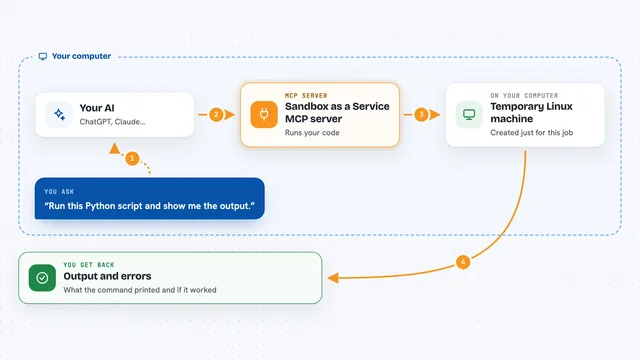
You ask your AI for something that involves running code, like making an image or testing a small script. Your AI sends the code to this helper. The helper starts a fresh, disposable container, which is like a tiny computer inside your computer, installs any packages the code needs, and runs the script. When it finishes, the helper shuts the container down and sends the output, and any files the script created, back to your AI. Your AI then shows you the result in the chat.
 Click to zoom
What you can do with it
- Run a JavaScript snippet and show you the printed output
- Install npm packages on the fly and use them in the script
- Save files the script creates, like images or text files, and give them back to you
- Start a sandbox you can reuse for several scripts in a row
- Run shell commands inside a running sandbox
- Search npm for packages and show you short descriptions
- Keep a sandbox alive to run a small server, then stop it when done
Try asking your AI
- “Create and run a JS script with a console.log("Hello World")”
- “Create and run a JS script that generates a QR code for https://nodejs.org/en and save it as qrcode.png. Use the qrcode package.”
- “Search npm for a package that makes charts and tell me what it does”
- “Start a sandbox, install lodash, and run a script that uses it”
What it gives back to you
You get back the text your script printed, shown right in the chat. If your script saved files, those come back too: images show up as pictures, and other files like text or JSON come back as attachments you can open. For sandbox sessions you also get a container ID you can reuse, and a short confirmation when the sandbox is stopped.
Before you start
What you need
- Docker installed and running on your computer
- The Claude desktop app or another MCP client
- A folder on your computer where output files can be saved (optional)
Good to know
Scripts run real code on your computer inside a container, and they can install packages from the internet, so only run code you are comfortable with.
Install it with your AI
Add Node.js Sandbox MCP server to your AI, no technical skills needed
You don't install anything by hand. You copy one prompt, paste it into an AI that can work on your computer, and it checks, installs and connects the server for you, asking you when it needs something.
Sign in to get the install prompt
Members get a ready-made prompt that lets the Claude desktop app check Node.js Sandbox MCP server, install it and connect it for them, step by step. You don't need any technical skills: you copy, paste and answer a few questions. Your connected AI can also find and install any of the 4,609 MCP servers here for you.
Who it's for
Office workers and anyone curious who wants their AI to run small JavaScript jobs and hand back real results without setting up a coding project.