MCP server · Coding · official
Reachpad MCP server
by Reachpad · official
Lets your AI create and use cloud coding workspaces that keep their files between chats.
Reachpad gives your AI a cloud computer it can use for coding work. The AI can create a workspace, run commands in it, save a copy, and come back to it later. It is handy for people who want an AI to build or test small software projects without keeping their own laptop running the whole time.
What is an MCP server? The 30-second version
On its own, your AI can only chat. An MCP server is a small helper program that gives your AI a new skill or a connection to another service. This one connects your AI to Reachpad, a service that runs cloud development computers. Once it is connected, your AI can ask Reachpad to make a workspace, run commands there, and pick up where it left off later.
What this MCP server does
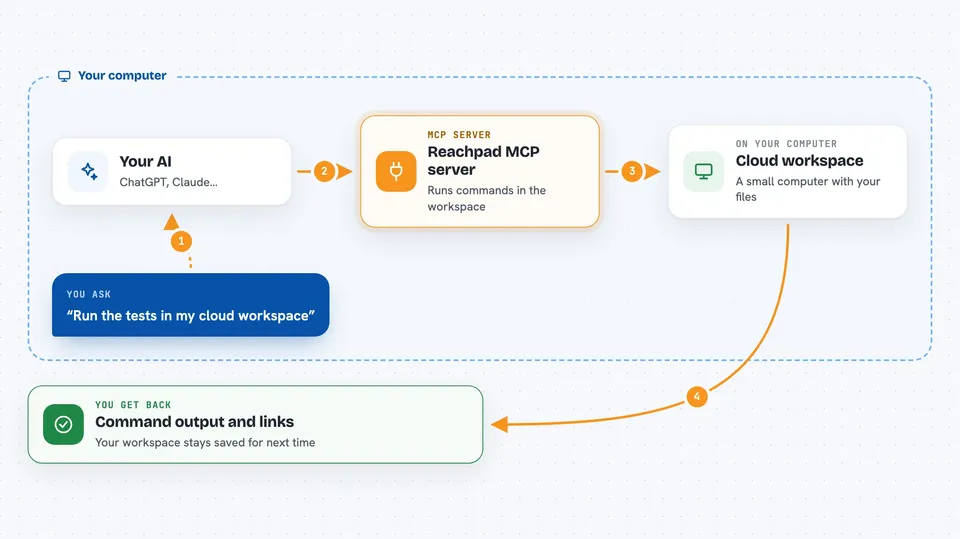
You ask your AI to do some coding work. The AI uses this helper to talk to Reachpad. Reachpad creates or wakes a cloud workspace, which is like a small computer with your files and installed tools already on it. The AI runs commands there and gets the output back. You see the results in your chat, and the workspace stays saved for next time.
 Click to zoom
What you can do with it
- Create a cloud workspace, optionally with a code repository already cloned in
- Run commands inside that workspace and read their output
- Checkpoint a workspace to make a copy you can try things on
- List your workspaces and see how many copies each one has
- Open a port so a running app gets a shareable web link
- Close a port when you are done with it
- Check how many compute credits you have left
Try asking your AI
- “Create a workspace with my project repo and install the dependencies”
- “Run the tests in my workspace and show me what failed”
- “Make a checkpoint of this workspace before I try the risky change”
- “Open port 3000 on my workspace and give me the link”
What it gives back to you
You get back short answers in the chat: command output, exit codes, lists of your workspaces, credit numbers, and web links for open ports. Long build logs are trimmed, with a note saying how much was cut, so your chat does not get flooded. When something cannot be done, the reply explains why and what to try instead.
Before you start
What you need
- A Reachpad account and its credential (a kind of password that identifies you to the service)
- Node.js installed on your computer so the npx command can run
- A coding assistant that supports MCP servers, such as Claude Code, Cursor, or ChatGPT
Good to know
A port link is not private: anyone signed in to Reachpad who has the link can open it, and running commands in a workspace can change or delete files there.
Install it with your AI
Add Reachpad MCP server to your AI, no technical skills needed
You don't install anything by hand. You copy one prompt, paste it into an AI that can work on your computer, and it checks, installs and connects the server for you, asking you when it needs something.
Sign in to get the install prompt
Members get a ready-made prompt that lets the Claude desktop app check Reachpad MCP server, install it and connect it for them, step by step. You don't need any technical skills: you copy, paste and answer a few questions. Your connected AI can also find and install any of the 4,361 MCP servers here for you.
Who it's for
Developers and technically curious office workers who want an AI to build, test, and share small software projects in the cloud.