MCP server · Developer tools
E2B Sandbox MCP server
by asif-nvc
Give your AI a disposable Linux computer in the cloud to clone repos, run commands, and test code safely.

This is a helper that lets your AI work inside a temporary Linux computer in the cloud, called a sandbox. It is handy if you want to try out a GitHub project, run tests, or make changes without installing anything on your own laptop. Everything happens far away from your machine, and you can throw the sandbox away when you are done.
What is an MCP server? The 30-second version
On its own, your AI can only chat with you. An MCP server is a small helper program that gives your AI a new skill or a connection to another service. This one connects your AI to E2B, a service that rents out temporary Linux computers in the cloud. Once it is connected, your AI can create one of those computers, run commands on it, and bring the results back to your chat.
What this MCP server does
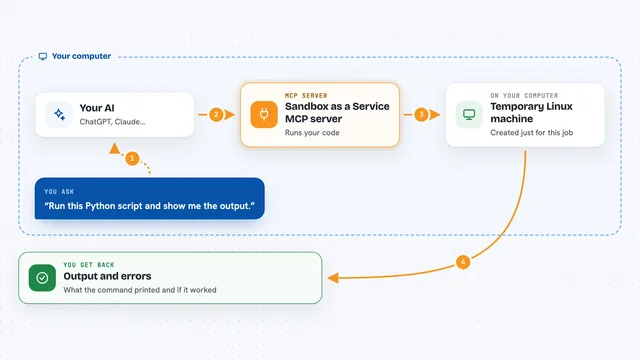
You ask your AI something like clone this repo and run the tests. Your AI uses this helper to create a fresh Linux machine in the cloud. The helper then clones the repository, runs your commands, and reads or writes files inside that machine. When it is done, your AI shows you the output, the errors, or the files it changed. Your own computer is never touched.
 Click to zoom
What you can do with it
- Create a fresh Linux sandbox in the cloud and shut it down when done
- Clone any public or private GitHub repository into the sandbox
- Run shell commands like npm install or npm test and see the output
- Read, write, rename, and delete files inside the sandbox
- Commit changes and push them back to GitHub
- Start a dev server and get a public URL to preview it in your browser
- Pause a sandbox and resume it later with all files still there
Try asking your AI
- “Create a sandbox, clone github.com/expressjs/express, and run the test suite”
- “Clone this repo, install dependencies, and tell me why the build fails”
- “Start the dev server and give me a URL I can open in my browser”
- “Pause this sandbox, I will continue tomorrow”
What it gives back to you
You get back plain answers in the chat: command output, error messages, test results, file contents, or a summary of what changed. If it started a web server, you get a public link you can open. If it pushed to GitHub, it tells you the commit went through. Long outputs are trimmed so your chat does not get flooded.
Before you start
What you need
- Node.js version 18 or newer on your computer
- The Claude Code app installed
- A free E2B API key from e2b.dev/dashboard (a kind of password for apps)
- Optional: a GitHub token if you want to work with private repos or push changes
Good to know
Sandboxes are real cloud machines with real internet access, and a git push or npm publish from inside one really happens, so check before letting your AI push or publish anything.
Install it with your AI
Add E2B Sandbox MCP server to your AI, no technical skills needed
You don't install anything by hand. You copy one prompt, paste it into an AI that can work on your computer, and it checks, installs and connects the server for you, asking you when it needs something.
Sign in to get the install prompt
Members get a ready-made prompt that lets the Claude desktop app check E2B Sandbox MCP server, install it and connect it for them, step by step. You don't need any technical skills: you copy, paste and answer a few questions. Your connected AI can also find and install any of the 4,361 MCP servers here for you.
Who it's for
Developers, testers, and anyone who wants to try or review code without setting it up on their own machine.