MCP server · Coding · official
Sandbox as a Service MCP server
by fstandhartinger · official
Lets your AI spin up a throwaway Linux computer to run code and show you the results.

This is a helper that gives your AI its own temporary Linux computer. The AI can run commands, write files, and start small programs there, then show you what happened. It is handy if you want your AI to actually try code instead of just talking about it, without touching your own machine.
What is an MCP server? The 30-second version
On its own, your AI can only chat. An MCP server is a small helper program that gives your AI a new skill or a connection to another service. This one connects your AI to Sandbox as a Service, a place that hands out temporary Linux machines. When you ask your AI to run something, it uses this helper to do it on one of those machines instead of on your computer.
What this MCP server does
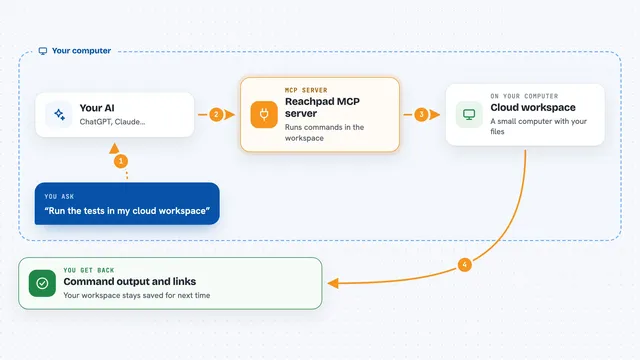
You ask your AI to run some code or a command. The AI uses this helper to create a fresh Linux machine just for that job. Then it sends your command to that machine and waits for it to finish. The machine sends back what the command printed, any errors, and whether it worked. When you are done, the machine is thrown away, so nothing is left behind on your computer.
 Click to zoom
What you can do with it
- Create a temporary Linux machine for a job
- Run shell commands and see the output
- Write and read files on that machine
- List what files a run produced
- Share a small web page or app from the machine with a public link
- Check how much time and credit you have left
- Destroy the machine when you are done
Try asking your AI
- “Create a sandbox and run python --version in it.”
- “Write a small Python script to a file, run it, and show me the output.”
- “Start a simple web server on port 8000 and give me a public link to it.”
- “List the files in the sandbox so I can see what my script created.”
- “How much credit do I have left on my account?”
What it gives back to you
You get back plain text in the chat. For commands, that means what the command printed, any error messages, and a number that says whether it succeeded. For files, you get the file contents or a list of names. For the account, you get your remaining credit and recent usage.
Before you start
What you need
- A Sandbox as a Service account (new accounts start with free credit and no card)
- An API key from your dashboard (a kind of password for apps; the site gives you one)
Good to know
The machine is temporary and gets destroyed when its time runs out, so save anything you want to keep before then.
Install it with your AI
Add Sandbox as a Service MCP server to your AI, no technical skills needed
You don't install anything by hand. You copy one prompt, paste it into an AI that can work on your computer, and it checks, installs and connects the server for you, asking you when it needs something.
Sign in to get the install prompt
Members get a ready-made prompt that lets the Claude desktop app check Sandbox as a Service MCP server, install it and connect it for them, step by step. You don't need any technical skills: you copy, paste and answer a few questions. Your connected AI can also find and install any of the 4,361 MCP servers here for you.
Who it's for
Anyone who wants their AI to actually run and test code safely, like developers, analysts, or students trying things out.