MCP server · Coding · official
YepCode MCP server
by yepcode · official
Lets your AI run small scripts safely in the cloud and use your YepCode processes as ready-made tools.
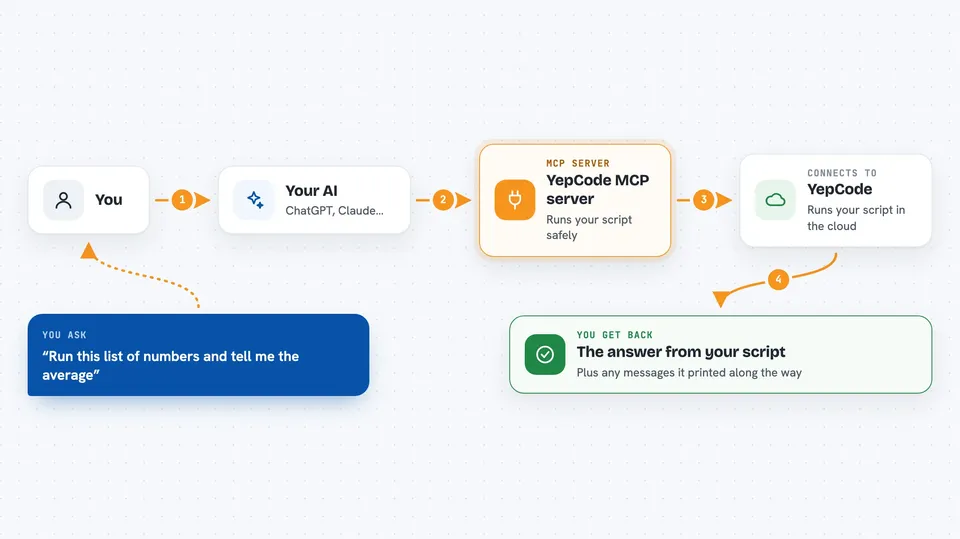
This is a helper that connects your AI assistant to YepCode, an online service where you can run small pieces of code in a safe, separate space. It is handy if you want your AI to actually do something with data, like run a script or trigger one of your saved YepCode jobs, instead of just talking about it. You do not need to be a programmer to set it up, but the things you ask it to run are code, so it helps to know what you want done.
What is an MCP server? The 30-second version
On its own, your AI can only chat. An MCP server is a small helper program that gives your AI a new skill or a connection to an outside service. This one connects your AI to YepCode, so when you ask for something, the AI can send a script or a job to YepCode and bring the result back to you. Think of it as giving your assistant a key to a workshop where it can build and test things for you.
What this MCP server does
You ask your AI to do something that involves running code, like crunching a list of numbers or calling a web service. The AI writes a short script and hands it to this helper. The helper sends that script to YepCode, which runs it in a safe, isolated space in the cloud. When it finishes, the helper brings back the result, any printed messages, and an error note if something went wrong. If you have saved YepCode jobs (called processes), you can also let the AI run those directly as tools.
 Click to zoom
What you can do with it
- Run a short JavaScript or Python script and get the result back
- Trigger one of your saved YepCode processes and see its output
- Upload, list, download, and delete files in your YepCode storage
- Set or remove environment variables in your YepCode workspace
- List your processes, schedules, executions, and modules
- Create, update, or delete processes and schedules
- Check the logs of a past or running execution
Try asking your AI
- “Run this list of numbers through a quick script and tell me the average”
- “Run my process tagged core and show me what it returned”
- “List the files in my YepCode storage and tell me their sizes”
- “Show me the last five executions and any errors in their logs”
What it gives back to you
You get back whatever the code or process produced: a value, a list, some numbers, or a short text answer. You also see any messages the script printed along the way, which helps you check what happened. If something failed, you get an error message instead. For file actions, you get a simple success or fail note, or the file contents.
Before you start
What you need
- A YepCode account (you can sign up for free)
- A YepCode API token from Settings then API credentials (a kind of password for apps)
- Node.js 18 or newer if you install it yourself, or Docker if you prefer that route
Good to know
This helper can run code and change or delete things in your YepCode workspace, including files, variables, and processes, so only connect it to an account you are comfortable letting your AI act in.
Install it with your AI
Add YepCode MCP server to your AI, no technical skills needed
You don't install anything by hand. You copy one prompt, paste it into an AI that can work on your computer, and it checks, installs and connects the server for you, asking you when it needs something.
Sign in to get the install prompt
Members get a ready-made prompt that lets the Claude desktop app check YepCode MCP server, install it and connect it for them, step by step. You don't need any technical skills: you copy, paste and answer a few questions. Your connected AI can also find and install any of the 4,361 MCP servers here for you.
Who it's for
Office workers and small teams who want their AI to run small scripts or trigger saved jobs without setting up their own servers.