
MCP server · Research
Storyflo MCP server
by Alisammour
Let your AI search audio news, play narrated stories, and pull declassified government case files for you.
Storyflo is a service that turns news and government documents into audio you can listen to. This MCP server connects your AI assistant to Storyflo, so you can ask for news on a topic or a declassified FBI case and get real results back. It is handy if you like catching up on news by listening, or if you are curious about released government files.
What is an MCP server? The 30-second version
On its own, your AI can only chat with you using what it already knows. An MCP server is a small helper that gives your AI a new skill, in this case a connection to Storyflo. Once it is connected, your AI can look things up on Storyflo and bring answers back to your chat. You just ask in normal words, and the helper does the looking.
What this MCP server does
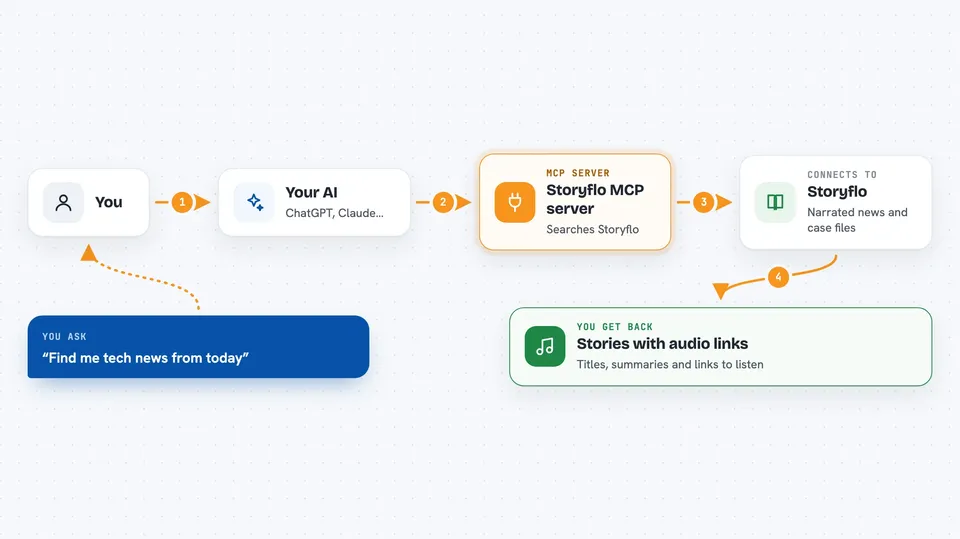
You ask your AI something like find me tech news from today. Your AI passes that request to this Storyflo helper. The helper talks to Storyflo's servers, which search their library of narrated articles and declassified case files. Storyflo sends back matching stories, summaries, and links to the audio. Your AI shows you the results right in the chat, and you can click to listen.
 Click to zoom
What you can do with it
- Search narrated news articles by topic or category like tech, finance, or science
- Fetch the full text and audio link for a specific article
- Get a roundup of top stories across several categories for the last day, week, or month
- Search the declassified library of FBI, CIA, NSA, and NASA case files
- Read the full record of a declassified case, including a transcript excerpt and source document link
- See which news stories are tied to actively traded Kalshi event contracts
- Set up a personal podcast feed for the topics you care about
Try asking your AI
- “Find me three science news stories from this week with audio”
- “Show me recent declassified CIA cases about UFOs”
- “What tech and finance stories are trending today”
- “Set up a podcast feed for tech and sports news”
What it gives back to you
You get back lists of stories or cases with titles, short summaries, and links to listen. If you ask for a full article or case, you get the body text and an audio link. For a digest, you get a roundup of top items across the categories you picked. Everything shows up as text in your chat, ready to read or click.
Before you start
What you need
- An AI assistant that supports MCP connections, like Claude Desktop or Cursor
- For the stdio bridge option: Node.js installed on your computer
Good to know
The subscribe_topic tool replaces your existing podcast feed if you pick a different set of topics, so check your current feed first if you do not want to lose it.
Install it with your AI
Add Storyflo MCP server to your AI, no technical skills needed
You don't install anything by hand. You copy one prompt, paste it into an AI that can work on your computer, and it checks, installs and connects the server for you, asking you when it needs something.
Sign in to get the install prompt
Members get a ready-made prompt that lets the Claude desktop app check Storyflo MCP server, install it and connect it for them, step by step. You don't need any technical skills: you copy, paste and answer a few questions. Your connected AI can also find and install any of the 4,609 MCP servers here for you.
Who it's for
People who like listening to news instead of reading it, and anyone curious about released government documents.


