
MCP server · Research · official
AgentQL MCP server
by tinyfish-io · official
Pull tidy, structured data out of any web page by simply describing what you want.
This is a small helper that lets your AI read a web page and pull out just the details you care about, like names, prices, or links. It is made by the team behind AgentQL, a service built for this exact job. It is handy if you often copy information from websites by hand into a spreadsheet or document.
What is an MCP server? The 30-second version
On its own, your AI can only chat with you. An MCP server is a small helper program that gives your AI a new skill or a connection to an app or service. This one connects your AI to AgentQL, a service that reads web pages and picks out the data you ask for. So when you say what you want from a page, your AI can actually go and get it instead of guessing.
What this MCP server does
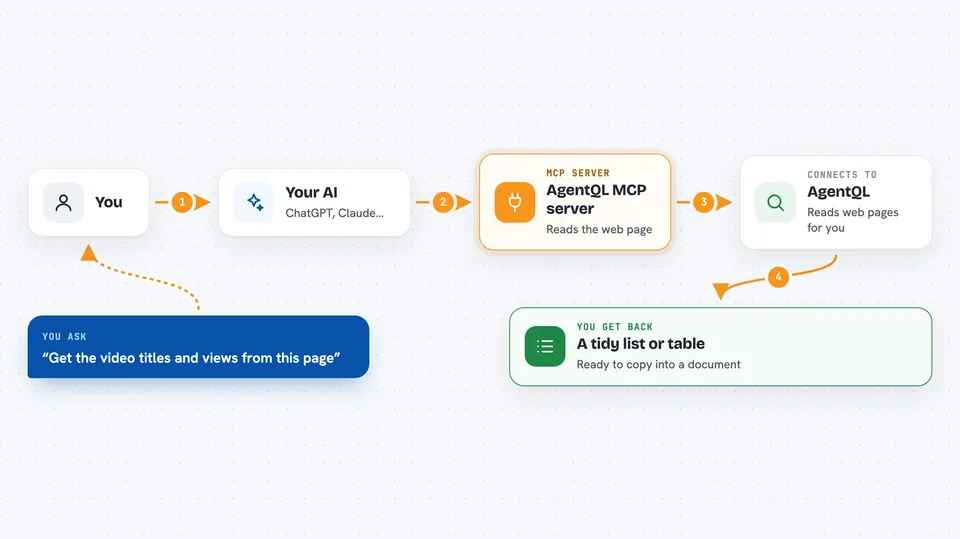
You give your AI a web address and a plain description of the data you want from that page. Your AI passes both to this helper, which sends them to AgentQL. AgentQL opens the page, finds the matching pieces, and sends them back. Your AI then shows you the result, usually as a neat list or table in the chat.
 Click to zoom
What you can do with it
- Pull a list of products with prices from a shopping page
- Collect names, job titles, and links from a team page
- Grab video titles, authors, and view counts from a search results page
- Turn a messy web page into a clean table you can paste into a document
- Extract contact details or addresses from a directory page
- Gather headlines and dates from a news or blog page
Try asking your AI
- “Extract the list of videos from https://www.youtube.com/results?search_query=agentql, with title, author, views, and url, and format it as a markdown table”
- “From this page, get every product name and its price, and skip the ads”
- “Pull the names and job titles of everyone listed on this team page”
- “Get the headlines and publish dates from this news page and put them in a table”
What it gives back to you
You get back the data you asked for, usually as a list or a table right in the chat. Each item has the fields you described, like a title, a price, or a link. If the page does not have something you asked for, that field may come back empty. You can then copy the result into a document or spreadsheet.
Before you start
What you need
- An AgentQL account and API key from the AgentQL Dev Portal (an API key is a kind of password for apps; the site gives you one for free)
- Node.js installed on your computer
- An app that supports MCP, like Claude Desktop, VS Code, Cursor, or Windsurf
Good to know
This helper reads public web pages for you, so avoid pointing it at pages with private or sensitive information you would not want sent to AgentQL.
Install it with your AI
Add AgentQL MCP server to your AI, no technical skills needed
You don't install anything by hand. You copy one prompt, paste it into an AI that can work on your computer, and it checks, installs and connects the server for you, asking you when it needs something.
Sign in to get the install prompt
Members get a ready-made prompt that lets the Claude desktop app check AgentQL MCP server, install it and connect it for them, step by step. You don't need any technical skills: you copy, paste and answer a few questions. Your connected AI can also find and install any of the 4,361 MCP servers here for you.
Who it's for
Anyone who regularly copies information from websites by hand, like researchers, marketers, analysts, and assistants.


