MCP server · Health and learning
say-it Pronunciation MCP server
Your AI can look up and play how developer and product names are actually pronounced.
This is a helper for your AI that answers the question "how do you say this word?" for tech names like kubectl, nginx and GIF. It comes from a community dictionary of 1,903 developer and product names, each with a written pronunciation and often a source. It is handy for anyone who sits in meetings, standups or calls and wants to say these names the way other people do.
What is an MCP server? The 30-second version
On its own, your AI can only chat with you using the words it already knows. An MCP server is a small helper program that gives your AI one extra skill or a connection to a service. This server connects your AI to the say-it pronunciation dictionary, so when you ask how a word sounds, the AI can look it up there and play the audio for you. You do not need to understand how it works inside; you just ask, and the AI uses this helper behind the scenes.
What this MCP server does
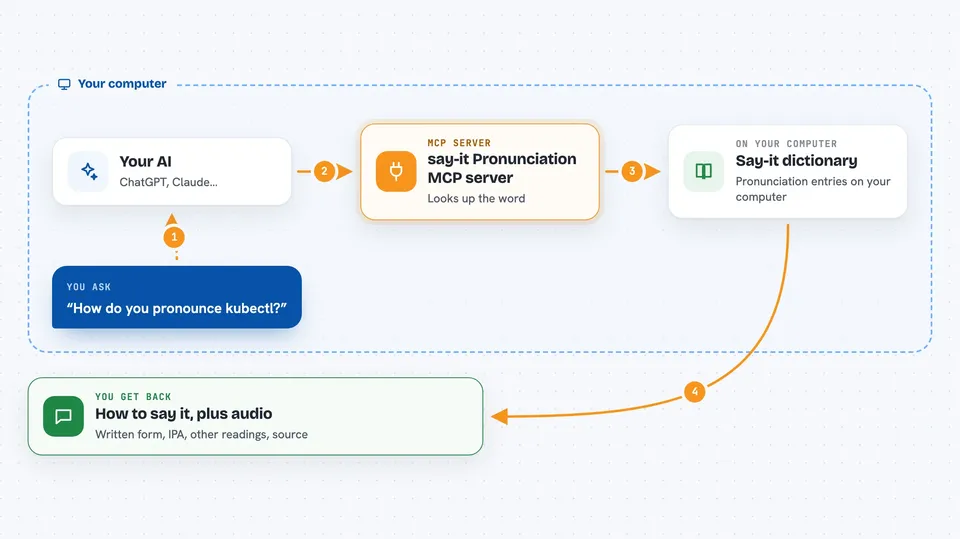
You ask your AI something like "how do you pronounce kubectl?" and it passes the word to this helper. The helper checks the community dictionary, finds the entry, and sends back the written pronunciation, the IPA, and any alternate readings. It can also play the audio out loud through your computer's speech, so you hear the word instead of guessing. If the entry has a source, such as the creator or an official page, the helper includes that too, so you can see why that reading is listed.
 Click to zoom
What you can do with it
- Hear how a tech word is pronounced, played out loud
- Look up the written pronunciation and IPA for a name
- See alternate readings when a word is still debated
- Check the source behind a pronunciation when one is cited
- Search the dictionary for words you are unsure about
- Ask about a word in another language, like Chinese, and get the answer
Try asking your AI
- “How do you pronounce kubectl?”
- “Say nginx out loud for me”
- “What is the correct way to say GIF?”
- “How do people pronounce, and is there a source?”
What it gives back to you
You get a short answer in the chat with the written pronunciation, the IPA, and any alternate readings. If audio is available, your AI can play it so you hear the word. When the dictionary has a source, the answer includes where that reading comes from. For debated words, you see both sides listed instead of just one.
Before you start
What you need
- The say-it MCP server installed or added to your AI app
- A computer with a built-in speech voice (macOS say, Linux espeak-ng, or Windows PowerShell)
Good to know
The dictionary is community-maintained and some entries are marked as contested, so a listed reading is not always the only correct one.
Install it with your AI
Add say-it Pronunciation MCP server to your AI, no technical skills needed
You don't install anything by hand. You copy one prompt, paste it into an AI that can work on your computer, and it checks, installs and connects the server for you, asking you when it needs something.
Sign in to get the install prompt
Members get a ready-made prompt that lets the Claude desktop app check say-it Pronunciation MCP server, install it and connect it for them, step by step. You don't need any technical skills: you copy, paste and answer a few questions. Your connected AI can also find and install any of the 4,609 MCP servers here for you.
Who it's for
Anyone who works with developers or tech teams and wants to say tool and product names the way others do, especially people in meetings, support, docs or sales.