
MCP server · Health and learning
Architect Cert MCP server
by Connectry-io
Turn Claude into your study tutor for the Claude Certified Architect exam, with questions, handouts and practice exams.
Architect Cert is a free study helper that turns Claude into a personal tutor for the Claude Certified Architect exam. It gives you practice questions, short lessons, practice exams and a step-by-step project to build. It is handy if you are preparing for this certification and want to study by simply chatting.
What is an MCP server? The 30-second version
On its own, your AI can only chat with you using what it already knows. An MCP server is a small helper program that gives your AI a new skill or a connection to something useful. This one connects your AI to a set of exam study materials, so it can pull up questions, lessons and practice exams for you. You just ask, and the helper fetches the right study content.
What this MCP server does
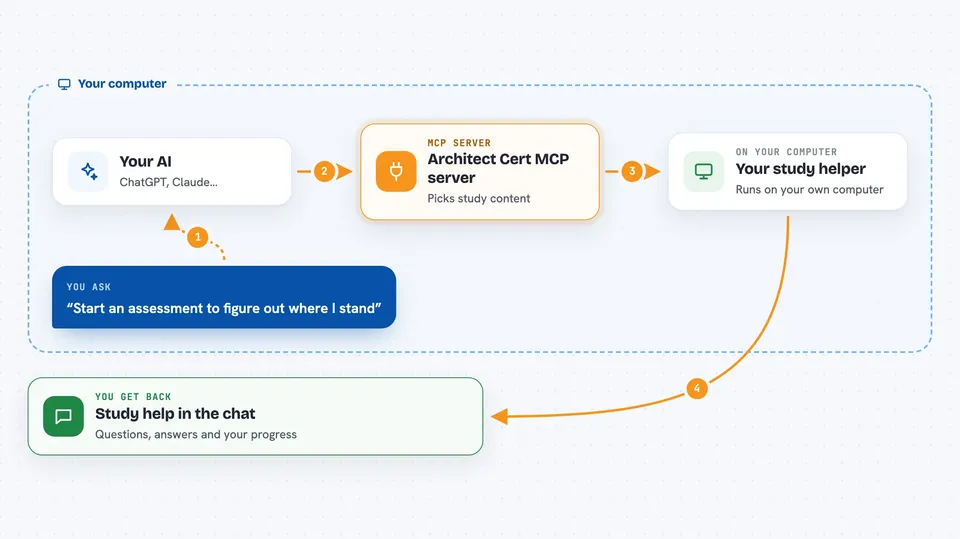
You ask your AI to help you study, for example to start an assessment or get a practice question. Your AI uses this helper to pick the right question or lesson from its library of study materials. The helper sends that content back, and your AI shows it to you in the chat with clickable answer buttons. When you answer, it grades you right away and explains what was right or wrong. It also keeps track of your progress and schedules reviews so you revisit the tricky topics.
 Click to zoom
What you can do with it
- Take a 15-question assessment to find your weak spots
- Practice exam-style questions by topic or difficulty
- Read short concept handouts for each exam topic
- Build your own practice project step by step
- Take full 60-question practice exams and see your score
- Track your progress and mastery levels on a dashboard
- Get a study plan that tells you what to review next
Try asking your AI
- “Start an assessment to figure out where I stand”
- “Give me a hard question about prompt engineering”
- “Teach me about task 2.3 tool provisioning”
- “I want to take a practice exam”
What it gives back to you
You get study content right in the chat: questions with clickable A/B/C/D answer buttons, short lessons, handouts with code examples, and practice exam scores. After each answer it tells you if you were right and explains why, and you can click follow-up buttons to see more detail. It also shows your progress as a checklist and a dashboard with mastery levels and exam history.
Before you start
What you need
- Node.js installed on your computer (the free program that runs this helper)
- An MCP-compatible app such as Claude Desktop or Claude Code
- A few minutes to add one line of setup to your app's config file
Good to know
This is a study tool, so it only reads and tracks your practice progress; it does not change anything outside your study sessions, but it does save your progress locally.
Install it with your AI
Add Architect Cert MCP server to your AI, no technical skills needed
You don't install anything by hand. You copy one prompt, paste it into an AI that can work on your computer, and it checks, installs and connects the server for you, asking you when it needs something.
Sign in to get the install prompt
Members get a ready-made prompt that lets the Claude desktop app check Architect Cert MCP server, install it and connect it for them, step by step. You don't need any technical skills: you copy, paste and answer a few questions. Your connected AI can also find and install any of the 4,361 MCP servers here for you.
Who it's for
Anyone preparing for the Claude Certified Architect exam, especially people who learn best by practicing questions and building a small project.


