MCP server · Health and learning
ENT ONE MCP server
Let your AI read and write in your child's French school ENT: messages, liaison book, homework and more.
This is a helper for parents whose children's school uses the ENT ONE, the online school space built on the Edifice platform. It lets your AI assistant read and write in that space for you, so you do not have to click through every page yourself. It is handy if you are a parent juggling messages, homework and forms for one or more children.
What is an MCP server? The 30-second version
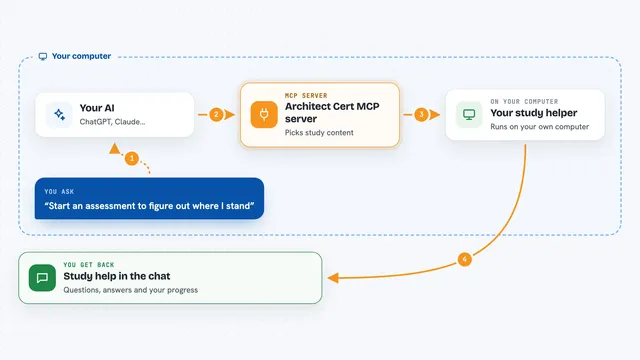
On its own, your AI can only chat. An MCP server is a small helper program that gives your AI a new skill or a connection to an app or service. This one connects your AI to the ENT ONE, so it can look things up there or do things for you when you ask. You install it once, give it your usual ENT login, and then you just talk to your assistant.
What this MCP server does
You ask your AI a question in normal words, like what happened at school this week. The AI uses this helper, which logs into the ENT with your own login and password. The helper reads or writes what you asked for, for example listing unread messages, signing a liaison book entry, or marking homework as done. Then it sends the answer back to your AI, which explains it to you in the chat. Nothing is stored on your computer: the session lives in memory and disappears when you stop it.
What you can do with it
- Read your messages from teachers and send new ones
- See which liaison book entries still need your signature and sign them
- List homework for a given day and mark items as done
- Read school news, class blogs and the calendar
- Drop files into the teacher's file box (casier)
- Look up a teacher or a parent in the school directory
- Read forms and wiki pages from the ENT
Try asking your AI
- “What happened on the ENT this week?”
- “Are there any liaison book entries I have not signed yet? Sign them.”
- “What is Lea's homework for Thursday? Tick the ones she has already done.”
- “Write to the CM1 teacher to say Lea will be absent Friday morning. Show me the message before sending it.”
What it gives back to you
You get answers in plain text in the chat: lists of messages, homework items, news summaries, calendar dates, or the names of files in a folder. When it writes something, like sending a message or signing an entry, it tells you what it did. Files can be downloaded or uploaded, up to 10 MB each. Dates come back in your own time zone.
Before you start
What you need
- Your usual ENT ONE login and password
- The address of your ENT (the default is the one for La Reunion)
- Rust 1.88 or newer if you install it with Cargo, or Docker if you prefer
- An AI assistant that supports MCP, like Claude Desktop or Claude Code
Good to know
It acts as you in the ENT and can send messages, sign entries or delete things, so always ask your assistant to show you a message before sending it and to confirm before any change.
Install it with your AI
Add ENT ONE MCP server to your AI, no technical skills needed
You don't install anything by hand. You copy one prompt, paste it into an AI that can work on your computer, and it checks, installs and connects the server for you, asking you when it needs something.
Sign in to get the install prompt
Members get a ready-made prompt that lets the Claude desktop app check ENT ONE MCP server, install it and connect it for them, step by step. You don't need any technical skills: you copy, paste and answer a few questions. Your connected AI can also find and install any of the 4,609 MCP servers here for you.
Who it's for
Parents of primary school children in France whose school uses the ENT ONE, especially those who want to save time on messages, homework and paperwork.