MCP server · Health and learning
Brightspace MCP server
by RohanMuppa
Ask your AI about your Brightspace grades, due dates, assignments, announcements and course files.

This is a small helper that connects your AI assistant to D2L Brightspace, the school website where your courses live. Once it is set up, you can just ask questions in plain words instead of clicking around the site. It is handy for students who want quick answers about grades, deadlines and class materials.
What is an MCP server? The 30-second version
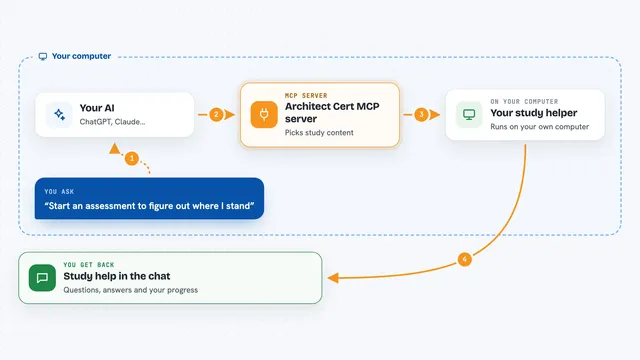
On its own, your AI can only chat with you. An MCP server is a small helper program that gives your AI a new skill or a connection to another service. This one connects your AI to your Brightspace account, so it can look things up there for you. When you ask a question, the AI passes it to this helper, and the helper talks to Brightspace and brings back the answer.
What this MCP server does
You ask your AI something like what is due this week. The AI sends that request to this helper program running on your computer. The helper signs in to your Brightspace account and pulls the information you asked for, such as assignments, grades, announcements or files. Then the AI turns that into a normal chat answer for you. You never have to open Brightspace yourself to get the answer.
 Click to zoom
What you can do with it
- Check your grades across all your courses
- See what assignments and quizzes are due soon
- Read announcements your professors posted
- Find and download course files like slides and PDFs
- Summarize assignment rubrics and specs
- Look up your instructor and TA contact info
- Read discussion posts and video transcripts
- Build a study plan from your upcoming due dates
Try asking your AI
- “What is due in the next 48 hours?”
- “Am I passing all my classes?”
- “Summarize every assignment I haven't turned in yet”
- “What did my CS professor announce this week?”
What it gives back to you
You get answers in the chat, written in normal sentences. Depending on what you ask, that could be a list of assignments with due dates, a summary of your grades, a short recap of an announcement, or a link to a file. You can also ask it to download files like slides or rubrics so you can use them elsewhere.
Before you start
What you need
- Node.js 20 or newer installed on your computer
- A Brightspace account at a school whose sign-in page the tool can handle (Purdue and SUNY campuses are supported automatically)
- A way to store a password on your computer, like macOS Keychain, Windows Credential Manager, or Linux Secret Service
- Your Brightspace password and whatever your school uses for two-step verification
Good to know
It signs in to your Brightspace account using your saved password, so only set it up on a computer you trust, and be careful about running automatic sign-in on a shared or public machine.
Install it with your AI
Add Brightspace MCP server to your AI, no technical skills needed
You don't install anything by hand. You copy one prompt, paste it into an AI that can work on your computer, and it checks, installs and connects the server for you, asking you when it needs something.
Sign in to get the install prompt
Members get a ready-made prompt that lets the Claude desktop app check Brightspace MCP server, install it and connect it for them, step by step. You don't need any technical skills: you copy, paste and answer a few questions. Your connected AI can also find and install any of the 4,361 MCP servers here for you.
Who it's for
Students at schools that use D2L Brightspace, especially those who want fast answers about grades, deadlines and course materials without clicking through the site.