MCP server · Health and learning
Campus CLI MCP server
by alejooroncoy
Lets your AI read your Blackboard courses, assignments, grades, announcements, and materials for you.

Campus CLI is a free helper that connects your AI assistant to your university Blackboard account. It was made for students at UPC in Peru, so your AI can look at your courses, homework, and grades without you opening a browser. If you use ChatGPT or Claude for school stuff, this saves you a lot of copying and pasting.
What is an MCP server? The 30-second version
On its own, your AI can only chat with you. It cannot see your university account. An MCP server is a small helper program that gives your AI a new skill, in this case a connection to your Blackboard Learn account at UPC. Once it is connected, you can just ask your AI about your courses, and it will go look things up for you.
What this MCP server does
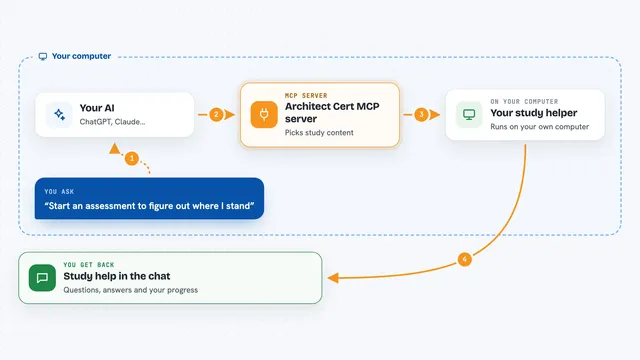
You ask your AI something like what homework is due this week. The AI passes that question to this helper program running on your computer. The helper logs in to your Blackboard account using your own session, reads the information you asked for, and sends it back. Then the AI turns it into a clear answer in the chat. You never have to open Blackboard yourself.
 Click to zoom
What you can do with it
- List your current courses and their details
- Show assignments that are still pending and their due dates
- Check your grades and instructor feedback
- Read course announcements and inbox messages
- Browse and download course materials and folders
- See your weekly class schedule with times and rooms
- Search academic sources like Crossref and OpenAlex
Try asking your AI
- “What assignments do I have pending this week?”
- “Show me my grades for Programacion Orientada a Objetos”
- “What did the professor say in the latest announcements for my Databases course?”
- “What is my class schedule for tomorrow?”
What it gives back to you
You get answers written in normal language, like a list of pending tasks with due dates or a summary of your grades. It can also give you links to files and download course materials to a folder on your computer. When it makes a change, like submitting an assignment, it asks you to confirm first.
Before you start
What you need
- Node.js version 22.13.0 or newer installed on your computer
- An active UPC account with access to Aula Virtual
- Your Microsoft SSO login, including MFA if your account uses it
- A computer where Chromium can open (the tool uses it once for login)
Good to know
It can submit assignments and change things in your Blackboard account, so always read what your AI is about to do before you confirm.
Install it with your AI
Add Campus CLI MCP server to your AI, no technical skills needed
You don't install anything by hand. You copy one prompt, paste it into an AI that can work on your computer, and it checks, installs and connects the server for you, asking you when it needs something.
Sign in to get the install prompt
Members get a ready-made prompt that lets the Claude desktop app check Campus CLI MCP server, install it and connect it for them, step by step. You don't need any technical skills: you copy, paste and answer a few questions. Your connected AI can also find and install any of the 4,361 MCP servers here for you.
Who it's for
UPC students who use ChatGPT or Claude for school and want their AI to see their Blackboard courses, homework, and grades directly.