
MCP server · Developer tools
Agent Health MCP server
by aos-standard
Lets your AI run a health check on an AI agent before you put it to work.
This is a small helper that lets your AI run a health check on another AI agent. It looks at things like the agent's setup file, its services, and the evidence it leaves behind, then tells you what looks fine and what needs attention. It is handy for people who build or manage AI agents and want a second pair of eyes before going live.
What is an MCP server? The 30-second version
On its own, your AI can only chat with you. An MCP server is a small helper program that gives your AI a new skill or a connection to something else. This one connects your AI to an agent health checker, so when you ask about an agent, your AI can actually run the check and read the results instead of guessing. You just talk normally, and the helper does the technical part behind the scenes.
What this MCP server does
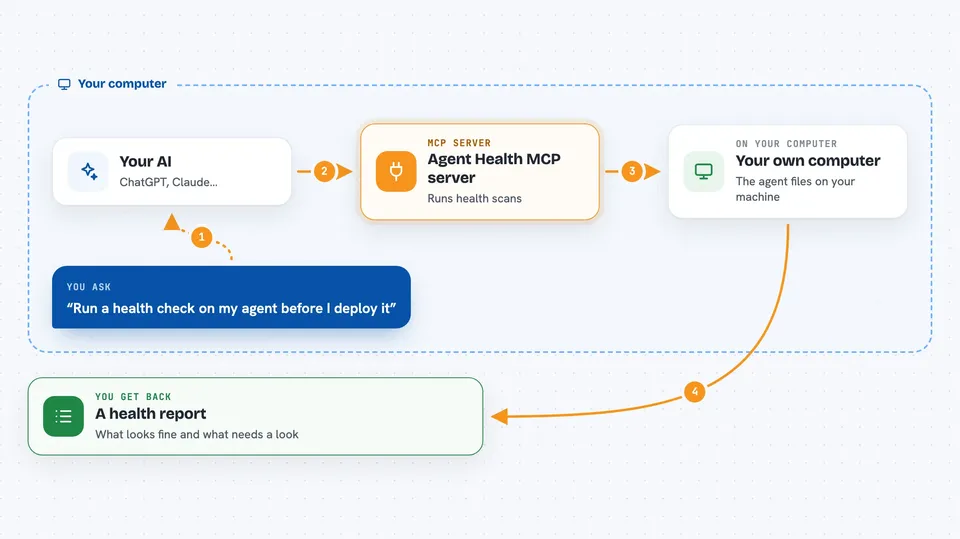
You ask your AI to check the health of an agent you are working on. Your AI passes that request to this helper program. The helper runs a set of advisory scans that look at the agent's manifest, its services, its immune loop, and its evidence. Then it hands the findings back, and your AI explains them to you in the chat. The scans are advisory, meaning they point out issues rather than fix them for you.
 Click to zoom
What you can do with it
- Run a health scan on an agent before you deploy it
- Check whether an agent's manifest looks complete
- Look at the services an agent depends on
- Review the immune loop part of an agent's setup
- See what evidence an agent has produced
- Get a plain summary of what looks healthy and what does not
Try asking your AI
- “Run a health check on my agent before I deploy it”
- “Does my agent's manifest look complete?”
- “Check the services my agent relies on and tell me if anything is missing”
- “Give me a health report on this agent and explain the problems in plain words”
What it gives back to you
You get back a report of the scan results, usually as a list of checks with notes on each one. Your AI then walks you through the findings in the chat, pointing out what passed and what needs a closer look. The output is advisory, so it is guidance rather than a final verdict. You can ask follow-up questions about any item.
Before you start
What you need
- Python installed on your computer
- The mcp-agent-health package installed (the README shows the pip command)
- An MCP client set up to use it, like the Claude desktop app (the README points to the config guide)
Good to know
The scans are advisory only, so treat the results as guidance and double-check anything important before you deploy.
Install it with your AI
Add Agent Health MCP server to your AI, no technical skills needed
You don't install anything by hand. You copy one prompt, paste it into an AI that can work on your computer, and it checks, installs and connects the server for you, asking you when it needs something.
Sign in to get the install prompt
Members get a ready-made prompt that lets the Claude desktop app check Agent Health MCP server, install it and connect it for them, step by step. You don't need any technical skills: you copy, paste and answer a few questions. Your connected AI can also find and install any of the 4,609 MCP servers here for you.
Who it's for
People who build, test, or manage AI agents and want a quick health check before putting one to work.



