
MCP server · Developer tools · official
AnyHook MCP server
by gba3124 · official
Let your AI create live webhook endpoints and read back the messages they receive.
This is a helper for AnyHook, a service that catches webhooks for you. A webhook is an automatic message one app sends to another when something happens, like a payment or a form submission. If you or your team deal with those messages, this lets your AI set up the receiving address and show you what arrived.
What is an MCP server? The 30-second version
On its own, your AI can only chat with you. An MCP server is a small helper program that gives your AI a new skill or a connection to an outside service. This one connects your AI to AnyHook, a webhook relay. Once it is connected, your AI can create a webhook address for you and read back the messages that land there, without you touching any settings pages.
What this MCP server does
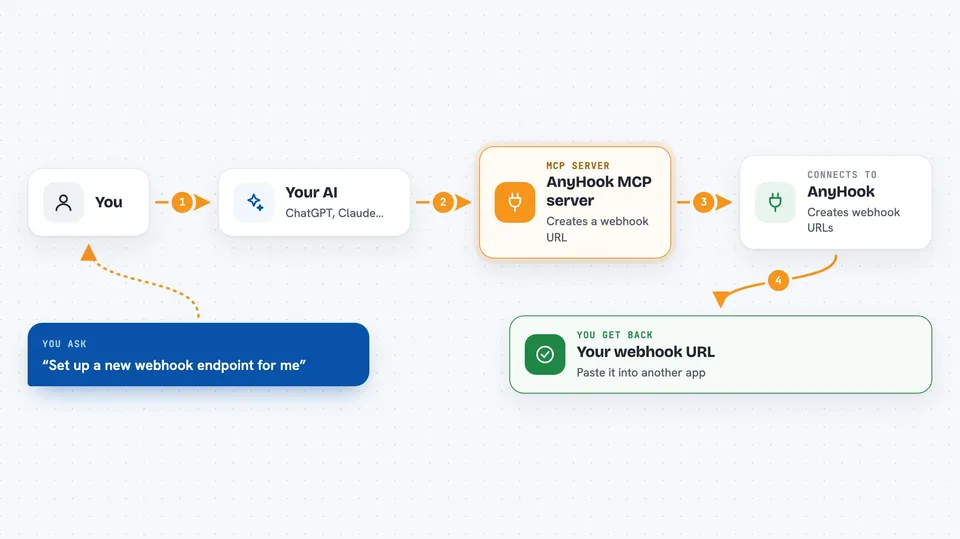
You ask your AI to set up a webhook address, and it uses this helper to create one on AnyHook. AnyHook then gives you a live URL you can paste into another app. When that app sends messages to the URL, AnyHook stores them. You can then ask your AI to show you what came in, and it reads the list back to you in the chat.
 Click to zoom
What you can do with it
- Create a live webhook endpoint in seconds
- List the webhook endpoints you have
- Show the messages a webhook has received
- Look at one delivery in detail
- Replay a past delivery so it is sent again
- Send a fake test message to check your setup
- Check that a signature on a delivery is genuine
Try asking your AI
- “Set up a new webhook endpoint for me”
- “Show me the last 10 messages my webhook received”
- “Replay that failed delivery from earlier today”
- “Send a test message to my webhook so I can see the format”
What it gives back to you
You get answers in plain chat: a new webhook URL when one is created, a list of your endpoints, or a list of the messages that arrived. You can also see the details of a single delivery, like when it came in and what it contained. When you replay or send a test, it tells you that the action was done.
Before you start
What you need
- The Claude desktop app or another tool that supports MCP servers
- Node.js 20 or newer on your computer if you run it locally
Good to know
The quickstart endpoint lasts 7 days unless you claim it into a free account, so do not rely on it for anything long term.
Install it with your AI
Add AnyHook MCP server to your AI, no technical skills needed
You don't install anything by hand. You copy one prompt, paste it into an AI that can work on your computer, and it checks, installs and connects the server for you, asking you when it needs something.
Sign in to get the install prompt
Members get a ready-made prompt that lets the Claude desktop app check AnyHook MCP server, install it and connect it for them, step by step. You don't need any technical skills: you copy, paste and answer a few questions. Your connected AI can also find and install any of the 4,361 MCP servers here for you.
Who it's for
Handy for developers, support engineers, and anyone who needs to catch and inspect webhook messages without setting up their own server.




