
MCP server · Developer tools · official
2ools MCP server
by 2ools · official
Turn a website your AI just wrote into a real, shareable link, and save it as a versioned project you can review and export.
2ools is a place where the websites, web apps and games your AI writes can actually live. This MCP server connects your AI chat to 2ools, so the thing your assistant just built becomes a real link you can open and share, with saved versions you can compare and export. It is handy if you use ChatGPT or Claude to make pages and want somewhere to keep and show the results.
What is an MCP server? The 30-second version
On its own, your AI can only chat. It can write HTML in the chat window, but it cannot put that page on the internet or keep it anywhere. An MCP server is a small helper that gives your AI one new skill. This one connects your AI to 2ools, so when you ask for a preview link or a saved project, the AI can actually go to 2ools and make it happen.
What this MCP server does
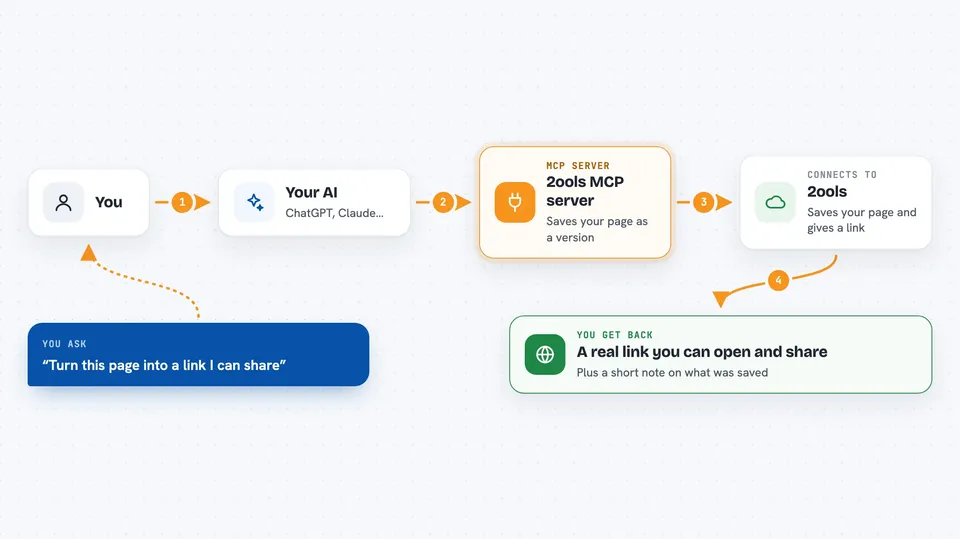
You ask your AI to do something, like turn the page it just wrote into a link. The AI passes that request to this helper, which talks to 2ools for you. 2ools saves the page as a version, gives back a real web address, and keeps the older versions so you can compare them later. You get the link or the answer right in the chat, without opening another app or copying files around.
 Click to zoom
What you can do with it
- Turn a standalone HTML page your AI just wrote into a free preview link anyone can open
- Save a whole conversation as a durable 2ools project with versions
- Ask for a change (like bigger headings) and get a new version to compare
- Compare two saved versions to see what changed
- Read the project timeline to see what happened since a certain day
- Export the source of a version as a zip download
- Share a version with a public or code-protected link, or turn sharing off
Try asking your AI
- “Write this as one standalone HTML document, create a free 2ools preview, and show me the link.”
- “Save this conversation as a durable 2ools project.”
- “Make the hours bigger and show me the new version.”
- “Compare the last two versions of this project.”
What it gives back to you
Usually you get a link you can click, plus a short note about what was saved or changed. When you ask for a comparison or a timeline, you get a plain summary in the chat. Exports come back as a download link that works for five minutes. The actual page files never get dumped into the chat, so your conversation stays short.
Before you start
What you need
- An AI client that supports MCP, like the Claude desktop app or ChatGPT with connectors
- A 2ools account for anything beyond the free preview (sign-in happens during setup)
- Nothing at all for the free preview tool
Good to know
Some tools can approve, reject, cancel or delete things in your 2ools account, so only connect it to an AI you trust and check before saying yes to destructive actions.
Install it with your AI
Add 2ools MCP server to your AI, no technical skills needed
You don't install anything by hand. You copy one prompt, paste it into an AI that can work on your computer, and it checks, installs and connects the server for you, asking you when it needs something.
Sign in to get the install prompt
Members get a ready-made prompt that lets the Claude desktop app check 2ools MCP server, install it and connect it for them, step by step. You don't need any technical skills: you copy, paste and answer a few questions. Your connected AI can also find and install any of the 4,361 MCP servers here for you.
Who it's for
People who build pages, small sites or simple games by chatting with an AI and want a real place to keep, share and export the results.




