MCP server · Privacy
WeMo MCP server
by apiarya
Ask your AI to find, check and control your WeMo smart plugs and lights on your home network.

This is a small helper that lets your AI assistant talk to your WeMo smart home devices. WeMo makes smart plugs, switches and dimmable lights that you normally control with a phone app. Once this is set up, you can just type what you want in plain English and your AI will do it for you.
What is an MCP server? The 30-second version
On its own, your AI can only chat. It cannot see or touch anything in your home. An MCP server is a small helper program that gives your AI a new skill. This one gives it a connection to your WeMo devices on your own Wi-Fi network, so it can look them up and switch them on or off when you ask.
What this MCP server does
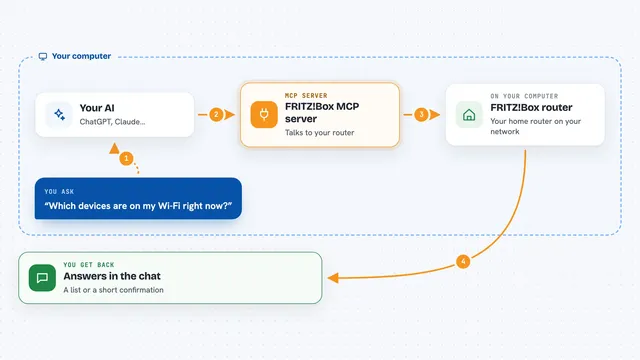
You ask your AI something like turn off the living room light. Your AI passes that request to this helper program running on your computer. The helper finds your WeMo devices on your home network and sends the command straight to the right device, without going through any cloud service. Then it tells your AI what happened, and your AI tells you. It can also scan your network to find devices, check their current state, rename them, and read their HomeKit setup codes.
 Click to zoom
What you can do with it
- Scan your home network to find all your WeMo devices
- Turn a device on, off, or toggle it
- Set the brightness of a dimmable light
- Check whether a device is on or off and what its brightness is
- Rename a device so it shows up with a friendlier name
- Get the HomeKit setup code for a device
- List all the devices it already knows about
Try asking your AI
- “Scan for WeMo devices on my network”
- “Turn off the living room light”
- “Set the office light to 75 percent”
- “What's the status of the bedroom lamp?”
What it gives back to you
You get back short, readable answers in the chat. For a scan, you get a list of devices with their names, types, IP addresses and current state. For a status check, you get the on or off state and brightness. For a control command, you get a short confirmation that the device was turned on, off or dimmed.
Before you start
What you need
- A computer on the same Wi-Fi network as your WeMo devices
- The uv tool installed (a free program that runs this helper; the README shows a one-line install command)
- Your home network subnet, for example 192.168.1.0/24 (the address range your devices live on)
- An AI app that supports MCP servers, such as Claude Desktop, VS Code or Cursor
Good to know
This helper can turn your devices on and off and rename them, so be clear about which device you mean before you ask.
Install it with your AI
Add WeMo MCP server to your AI, no technical skills needed
You don't install anything by hand. You copy one prompt, paste it into an AI that can work on your computer, and it checks, installs and connects the server for you, asking you when it needs something.
Sign in to get the install prompt
Members get a ready-made prompt that lets the Claude desktop app check WeMo MCP server, install it and connect it for them, step by step. You don't need any technical skills: you copy, paste and answer a few questions. Your connected AI can also find and install any of the 4,066 MCP servers here for you.
Who it's for
Anyone with WeMo smart plugs, switches or lights who wants to control them by typing plain English to their AI instead of opening an app.