MCP server · Coding
NeuroCode MCP server
by Arkz-Deepak
Lets your AI find the exact code related to a bug and write a fix, using a small local model on your laptop.
NeuroCode is a helper program that works with your AI to fix bugs in a code project. It picks out only the parts of the code that matter for the bug, so a small AI model running on your own laptop can suggest a fix. It is handy for developers who want to repair code without sending it to the cloud.
What is an MCP server? The 30-second version
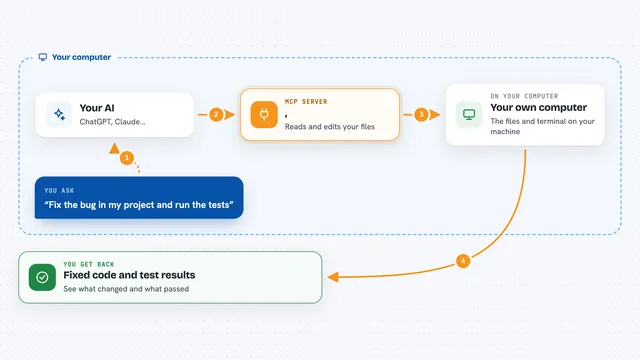
On its own, your AI can only chat. An MCP server is a small helper program that gives your AI a new skill or a connection to an app. This one gives your AI a way to look inside a code project and find the pieces related to a bug. When you ask your AI to fix something, it uses NeuroCode to gather the right code and then proposes a change.
What this MCP server does
You tell your AI about a bug in your project. The AI asks NeuroCode to find the code that is likely involved. NeuroCode builds a map of your code in memory, picks the most relevant parts, and keeps the result small (under 1,200 tokens). Then a local AI model (like Ollama) writes a suggested fix. You get back a short patch you can review and apply.
What you can do with it
- Find the code related to a bug in your project
- Get a small, focused snippet of code to look at
- Ask a local AI model to suggest a fix
- Check how much graphics memory your laptop has free
- See if the tool is running in memory without wearing out your disk
Try asking your AI
- “Find the code related to a ZeroDivisionError in matrix normalization and suggest a fix”
- “Show me the most relevant parts of my project for a bug in the login function”
- “Use Ollama to repair the bug in my repository and give me the patch”
- “Check my laptop's GPU memory and tell me if it can run a local model”
What it gives back to you
You get back a short list of code snippets that are most relevant to the bug, plus a suggested patch in a simple search-and-replace format. The AI shows this in the chat so you can read it and decide whether to apply it. You also get simple health information like how much GPU memory is free.
Before you start
What you need
- Python installed on your computer
- The neurocode-ai package installed (pip install neurocode-ai)
- A local AI model running through Ollama (for the repair feature)
- A code project on your computer that you want to fix
Good to know
It can suggest changes to your code, so always review the patch before applying it.
Install it with your AI
Add NeuroCode MCP server to your AI, no technical skills needed
You don't install anything by hand. You copy one prompt, paste it into an AI that can work on your computer, and it checks, installs and connects the server for you, asking you when it needs something.
Sign in to get the install prompt
Members get a ready-made prompt that lets the Claude desktop app check NeuroCode MCP server, install it and connect it for them, step by step. You don't need any technical skills: you copy, paste and answer a few questions. Your connected AI can also find and install any of the 4,611 MCP servers here for you.
Who it's for
Developers and programmers who want to fix bugs in their code using a small local AI model on their own laptop, without sending code to the cloud.