
MCP server · Security
truecopy MCP server
by askalf
Check and pin your AI skills and MCP servers so a tampered or poisoned tool never runs.
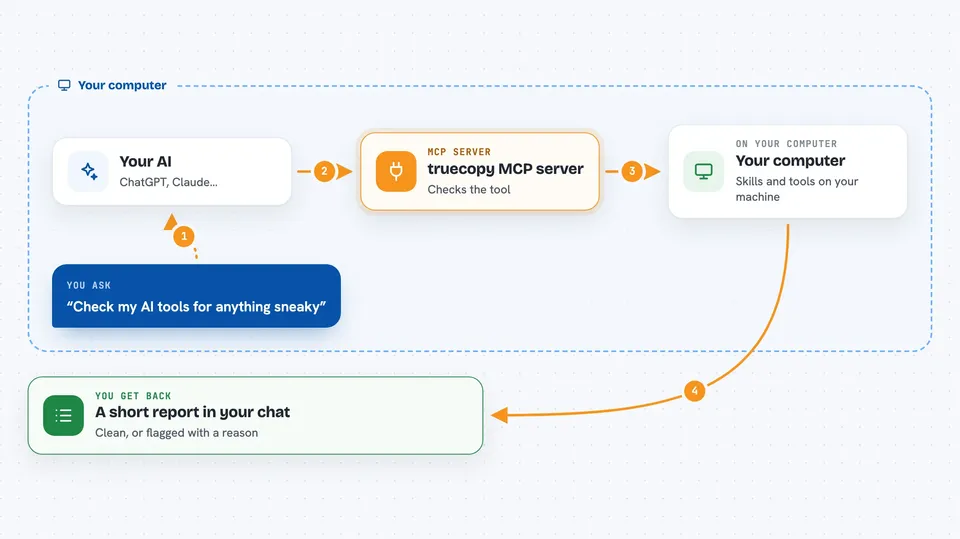
truecopy is a safety checker for the extra skills and helper programs you plug into your AI. Before one of them runs, truecopy looks at it, saves a fingerprint of the version you approved, and later notices if that version quietly changed. It is handy for anyone who installs tools from marketplaces or a teammate's folder and wants to know they are still the same safe files.
What is an MCP server? The 30-second version
On its own, your AI can only chat with you. An MCP server is a small helper program that gives your AI a new skill or a connection to an app, and here it connects your AI to truecopy, a tool that checks other skills and servers. When you ask your AI to check or approve a tool, it passes that request to truecopy, which does the looking and reports back. Think of truecopy as the security desk your AI walks past before it picks up any new tool.
What this MCP server does
You point truecopy at a skill or MCP server, and it reads the tool's name, description, and settings looking for hidden instructions that try to trick your AI. If the tool looks clean, truecopy saves it in a lock file with a fingerprint, and you can also sign it so you know who approved it. Later, each time you run a check, truecopy compares the current files against that saved fingerprint. If anything changed, it warns you and stops the check with a failure, so a silently updated or poisoned tool does not reach your AI.
 Click to zoom
What you can do with it
- Scan a skill or MCP server for hidden poisoning before you use it
- Pin an approved version into a lock file with a fingerprint
- Sign a pinned tool so you know who approved it
- Re-check every pin for drift or poisoning in one command
- Block a drifted or poisoned skill at the moment it is invoked
- Run truecopy as a proxy that only passes pinned tools through
- Add a one-line check to your build so bad tools fail the build
What it gives back to you
You get a short report in the chat. A clean tool shows up as pinned or verified, and a problem shows up as flagged or drifted with the tool name and a short reason. If something changed, you also see the old and new fingerprints so you can compare. In a build, a failure shows up as a non-zero exit that stops the build.
Before you start
What you need
- Node.js 18 or newer installed on your computer
- The truecopy package installed with npm i -g @askalf/truecopy
- A terminal where you can run truecopy commands
Good to know
truecopy reads the files and tool definitions you point it at, so only run it on folders you are allowed to inspect.
Install it with your AI
Add truecopy MCP server to your AI, no technical skills needed
You don't install anything by hand. You copy one prompt, paste it into an AI that can work on your computer, and it checks, installs and connects the server for you, asking you when it needs something.
Sign in to get the install prompt
Members get a ready-made prompt that lets the Claude desktop app check truecopy MCP server, install it and connect it for them, step by step. You don't need any technical skills: you copy, paste and answer a few questions. Your connected AI can also find and install any of the 4,609 MCP servers here for you.
Who it's for
Developers, IT and security people, and anyone who installs AI skills or MCP servers from marketplaces and wants to check them first.



