MCP server · Research
Russian New-Build Checker MCP server
by atomno-mcp
Lets your AI check Russian developers, escrow and construction permits through the EISZHS API, if you have a contract.
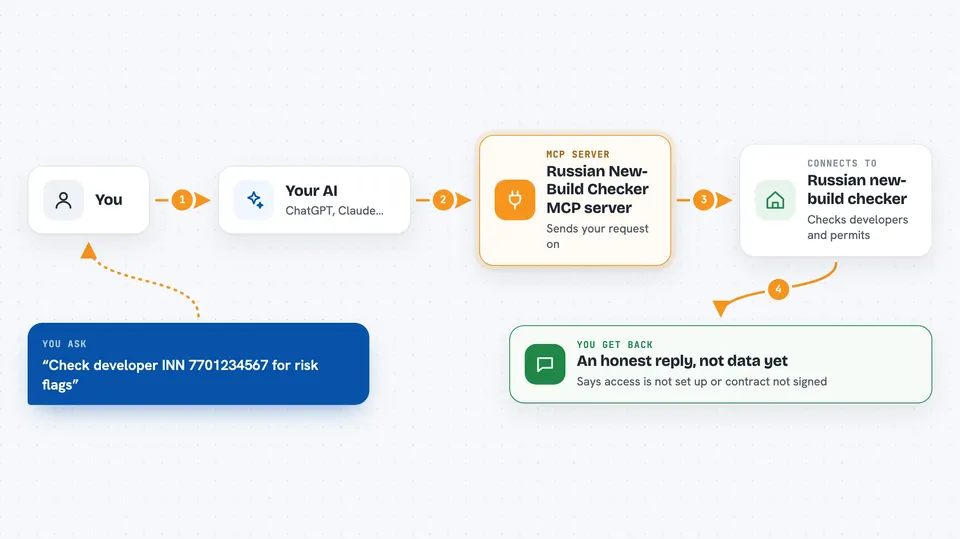
This is a small helper that connects your AI assistant to the Russian new-build information system EISZHS. It is meant for people who already have an official API contract with EISZHS and want to ask their AI questions about developers and building projects. Right now the tool is honest about one thing: without a contract and without the method list, it will simply say it cannot check anything yet.
What is an MCP server? The 30-second version
On its own, your AI can only chat with you. An MCP server is a small helper program you add to your AI, and it gives the AI a new skill or a connection to an outside service. This one is meant to connect your AI to EISZHS, the Russian system that holds data about new-build projects and developers. Once connected, you could ask your AI to look up a developer or a building, and it would use this helper to fetch the answer.
What this MCP server does
You ask your AI something like checking a developer by their tax number. The AI passes that request to this helper. The helper is supposed to talk to the EISZHS API using your contract credentials. Right now, if you have no credentials, it replies honestly that access is not set up. If you do have credentials, it still replies that the method list is closed until the contract is signed, so no live check happens yet.
 Click to zoom
What you can do with it
- Check a developer by their Russian tax number (INN) or registration number (OGRN)
- Look up a project declaration for a specific building
- Check escrow information for a building
- Check a construction permit for a building
- List new-build projects using filters
- Get a risk summary for a developer by INN
Try asking your AI
- “Check the developer with INN 7701234567 and tell me if there are any risk flags”
- “Show me the project declaration for building object_id 12345”
- “Is there escrow information for object_id 12345”
- “List new-build projects in Moscow that were started this year”
What it gives back to you
Right now it returns honest refusal messages, not real data. If you have no credentials, it says access is not configured. If you have credentials, it says the method list is closed until the contract is signed. Once the method list is available, it should return developer details, project declarations, escrow status, permit information and risk summaries in your chat.
Before you start
What you need
- A signed API contract with EISZHS (business.dom.rf) for legal entities
- The client ID and client secret from that contract
- Python and pipx or uvx installed on your computer
Good to know
Right now it cannot actually check anything without an EISZHS contract and the closed method list, so do not rely on it for real due diligence yet.
Install it with your AI
Add Russian New-Build Checker MCP server to your AI, no technical skills needed
You don't install anything by hand. You copy one prompt, paste it into an AI that can work on your computer, and it checks, installs and connects the server for you, asking you when it needs something.
Sign in to get the install prompt
Members get a ready-made prompt that lets the Claude desktop app check Russian New-Build Checker MCP server, install it and connect it for them, step by step. You don't need any technical skills: you copy, paste and answer a few questions. Your connected AI can also find and install any of the 4,609 MCP servers here for you.
Who it's for
This is for people doing due diligence on Russian new-build projects, like analysts, legal teams or real estate professionals who already have an EISZHS API contract.