MCP server · Music
Myinstants MCP server
by austenstone
Lets your AI search and play meme sounds from myinstants.com through your speakers.
This is a small helper that connects your AI to myinstants.com, a huge free soundboard full of meme sounds, vine booms, and funny clips. Once it is set up, you can just ask your AI to play a sound and it will come out of your computer speakers. It is mostly for fun, and it is handy if you like having sound effects while you work or chat.
What is an MCP server? The 30-second version
On its own, your AI can only chat with you in text. An MCP server is a small helper program that gives your AI a new skill or a connection to an app or service. This one connects your AI to myinstants.com, the soundboard website, so the AI can search for sounds there and play them for you. You do not need to understand how it works inside. You just ask, and the AI uses this helper to make it happen.
What this MCP server does
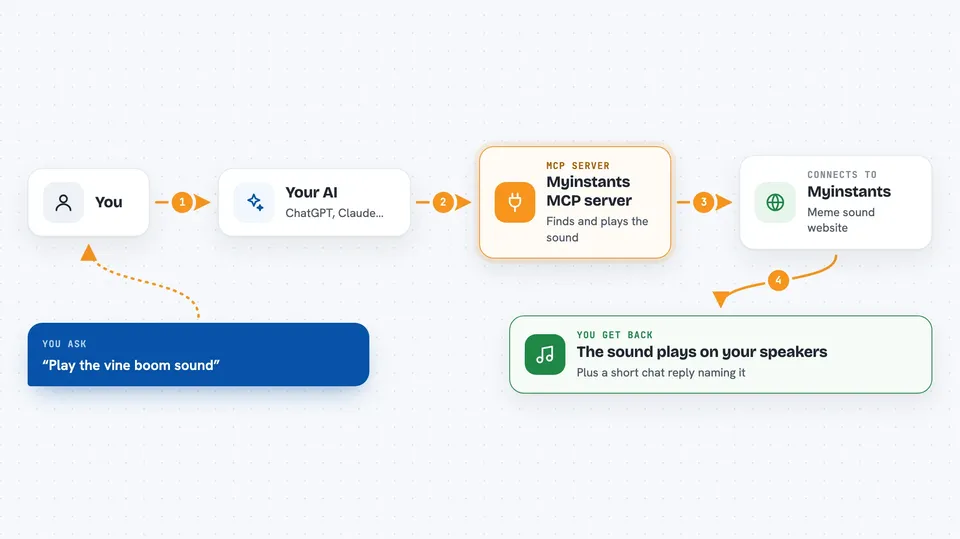
You ask your AI something like play the vine boom sound. The AI sends that request to this helper program on your computer. The helper searches myinstants.com for a matching sound, finds the audio file, and plays it through your speakers. You hear the sound, and the AI tells you what it played. It can also browse categories and show you what is trending right now.
 Click to zoom
What you can do with it
- Search myinstants.com for any sound by name
- Play a sound through your speakers right away
- Browse sounds by category like memes, games, or reactions
- See which sounds are trending right now
- Get details about a sound like views and uploader
- List the audio output devices on your computer
- Queue several sounds so they play one after another
Try asking your AI
- “Play the vine boom sound”
- “Find me a sad trombone sound and play it”
- “What sounds are trending on myinstants right now?”
- “Show me sounds in the memes category”
What it gives back to you
You get a short reply in the chat, usually the name of the sound and a note that it is playing. If you asked for a search or a category, you get a list of matching sounds with their names and links. If you asked for trending, you get a list of what is popular right now. The sound itself plays out loud through your speakers, not in the chat.
Before you start
What you need
- The Claude desktop app or another AI app that supports MCP servers
- Node.js installed on your computer (the free program that runs the helper)
- A working speaker or headphone output on your computer
Good to know
It plays sounds out loud through your speakers, so be careful in quiet places like an office or a library.
Install it with your AI
Add Myinstants MCP server to your AI, no technical skills needed
You don't install anything by hand. You copy one prompt, paste it into an AI that can work on your computer, and it checks, installs and connects the server for you, asking you when it needs something.
Sign in to get the install prompt
Members get a ready-made prompt that lets the Claude desktop app check Myinstants MCP server, install it and connect it for them, step by step. You don't need any technical skills: you copy, paste and answer a few questions. Your connected AI can also find and install any of the 4,361 MCP servers here for you.
Who it's for
Anyone who likes meme sounds and wants their AI to play them, especially people working on fun projects, streaming, or just messing around with AI tools.