
MCP server · Browser automation
Ghostfox MCP server
by autokeren
Lets your AI open web pages in its own private browser, read them, click, type and fill in forms for you.
Ghostfox is a browser that runs on your own computer and that your AI assistant can drive for you. It is made for people who want their AI to actually visit websites, read what is on the page and do things there, without sending your logins and cookies through someone else's cloud. It is handy if you do a lot of repetitive work on websites and want your AI to handle the clicking.
What is an MCP server? The 30-second version
On its own, your AI can only chat. It cannot open a website, see what is on the page or click a button. An MCP server is a small helper program that gives your AI a new skill, and here that skill is a real browser called Ghostfox. Once it is connected, your AI can open pages, read them and act on them for you when you ask.
What this MCP server does
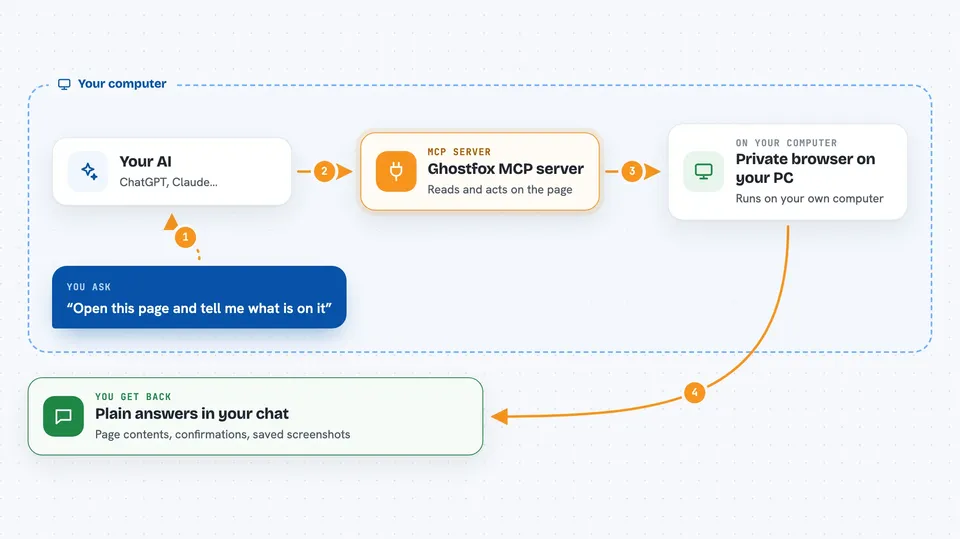
You ask your AI something like "open this page and tell me what is on it". Your AI passes that to Ghostfox, which starts a private browser session on your machine and loads the page. Ghostfox reads the page and hands back a clean list of the buttons, links, text boxes and other things it can see, along with whether you are logged in. Your AI then picks the right item and tells Ghostfox to click it or type into it, and Ghostfox reports back what actually happened. You see the result in your chat, and everything is saved on your computer.
 Click to zoom
What you can do with it
- Open a web page and list everything clickable and readable on it
- Click buttons and links by their name instead of fiddly page code
- Type into text boxes and fill in forms
- Check whether you are still logged in before doing anything
- Take screenshots and read text off images on the page
- Wait for something to appear instead of guessing how long to sleep
- Record what happened during a session so you can look back at it
What it gives back to you
You get back plain answers in the chat: a list of what is on the page, the text you asked for, or a short confirmation that a click or a form fill worked. It also tells you things like whether you are logged in, the page title and address, and how many characters actually landed in a text box. Screenshots and a full record of the session are saved on your computer, and you can ask for them any time.
Before you start
What you need
- A computer running Linux (the ready-made packages are built for Linux x86_64)
- Node.js if you install it through npm, or Python if you install it through pip, or Docker
- Permission to test the websites you point it at
Good to know
It can click, type and submit things on real websites on your behalf, so only point it at sites you are allowed to test and check before letting it send or delete anything.
Install it with your AI
Add Ghostfox MCP server to your AI, no technical skills needed
You don't install anything by hand. You copy one prompt, paste it into an AI that can work on your computer, and it checks, installs and connects the server for you, asking you when it needs something.
Sign in to get the install prompt
Members get a ready-made prompt that lets the Claude desktop app check Ghostfox MCP server, install it and connect it for them, step by step. You don't need any technical skills: you copy, paste and answer a few questions. Your connected AI can also find and install any of the 4,361 MCP servers here for you.
Who it's for
People who do repetitive work on websites, like filling forms, checking dashboards or gathering information, and want their AI to do the clicking for them.


