
MCP server · No-code
n8n MCP server
Your AI can build n8n workflows, check them for mistakes, and explain why a run failed.
This is a helper for people who build automations in n8n. It lets your AI write workflow files, spot common mistakes before you import them, and explain what went wrong when a workflow fails. Handy if you use n8n often and want a second pair of eyes.
What is an MCP server? The 30-second version
On its own, your AI can only chat. An MCP server is a small helper program that gives your AI a new skill or a connection to another app. This one connects your AI to n8n, the tool people use to build automations. Once it is set up, you can ask your AI to make or check n8n workflows, and it will actually do it instead of just talking about it.
What this MCP server does
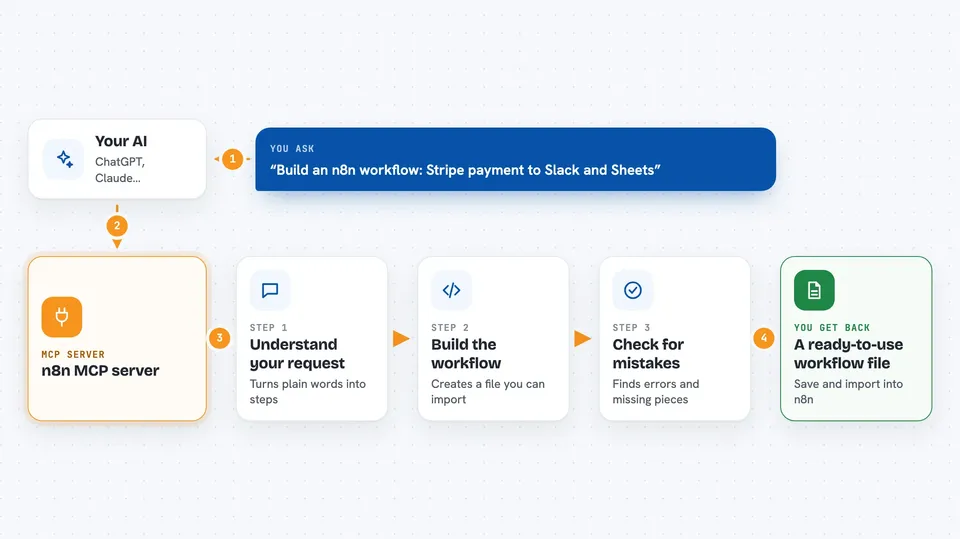
You describe what you want in plain words, like a Stripe payment going to Slack. Your AI uses this helper to turn that into an n8n workflow file you can import. You can also paste in a workflow and ask the helper to check it for common problems, like old node types or missing pieces. If a workflow failed, you paste the run details and the helper tells you which step broke and why. If you connect it to your live n8n account, it can also list, fetch, and turn workflows on or off for you.
 Click to zoom
What you can do with it
- Turn a plain-English description into an n8n workflow file
- Check a workflow for errors and warnings before you import it
- Explain why a failed run stopped, step by step
- Compare two versions of a workflow to see what changed
- Build a small test workflow that runs just one node
- Show a timeline of each node in a run, with timing and item counts
- List, fetch, create, and switch on or off workflows in your live n8n account
Try asking your AI
- “Build me an n8n workflow: Stripe payment comes in, post to Slack and add a row to Google Sheets.”
- “Here is my workflow JSON. Lint it and tell me what is wrong.”
- “This execution failed. Why is the Slack node not firing?”
- “Compare these two workflow files and tell me what changed.”
What it gives back to you
You get back plain answers in the chat. For a workflow, you get a JSON file you can save and import into n8n. For a check, you get a list of errors and warnings, each with a short hint. For a failed run, you get a per-node breakdown showing which step returned nothing and what to look at next.
Before you start
What you need
- Node.js 20 or later on your computer
- An MCP host like Claude Desktop or Cursor
- Optional: your n8n address and an API key from n8n (Settings, then API, then Create API key) if you want it to work with your live workflows
Good to know
If you connect it to your live n8n account, it can create workflows and switch them on or off, so keep an eye on what you ask it to do.
Install it with your AI
Add n8n MCP server to your AI, no technical skills needed
You don't install anything by hand. You copy one prompt, paste it into an AI that can work on your computer, and it checks, installs and connects the server for you, asking you when it needs something.
Sign in to get the install prompt
Members get a ready-made prompt that lets the Claude desktop app check n8n MCP server, install it and connect it for them, step by step. You don't need any technical skills: you copy, paste and answer a few questions. Your connected AI can also find and install any of the 4,361 MCP servers here for you.
Who it's for
People who build and maintain n8n automations, especially anyone who debugs failed runs or wants a quick check before importing a workflow.



