MCP server · Developer tools
pyATS MCP server
Lets your AI look up, check, and change settings on Cisco network devices for you.

This is a helper program that connects your AI to real network devices, like Cisco switches and routers, using a tool called pyATS. It is handy for network engineers and anyone who looks after switches and routers and wants to ask questions about them in plain English. Instead of logging into each device by hand, you describe what you want and the AI does the legwork.
What is an MCP server? The 30-second version
On its own, your AI can only chat. An MCP server is a small helper program that gives your AI a new skill or a connection to something outside the chat. This one connects your AI to your network devices through pyATS, so it can look things up or make changes there when you ask. You run this helper once, point your AI at it, and then talk to your AI like you would to a colleague who already knows the network.
What this MCP server does
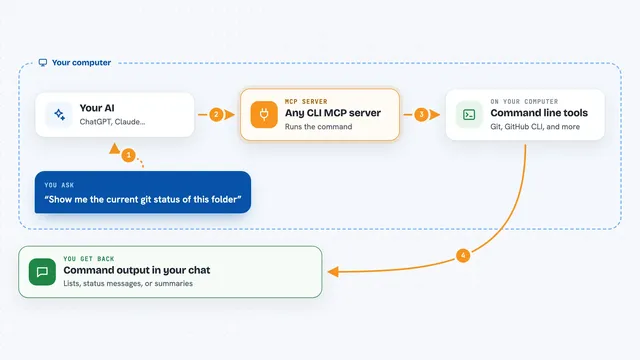
You ask your AI a question about your network, like what devices you have or how a switch is doing. Your AI passes that request to this helper program. The helper then talks to your actual switches and routers over the network, using pyATS and Genie behind the scenes. It collects the answer, tidies it up, and hands it back to your AI. Your AI then shows you the result in the chat, in plain words or a neat list.
 Click to zoom
What you can do with it
- List all the devices in your testbed
- Run a show command on one device and get the output parsed into a tidy format
- Run the same command across many devices at once
- Apply a configuration change and see a before and after difference
- Roll a device back to its last saved configuration
- Check a device's health, like CPU, memory, and interfaces
- Find which interface owns a particular IP address
Try asking your AI
- “What devices are in the testbed?”
- “Show me the BGP summary on CORE1”
- “Run show ip interface brief across every switch”
- “Snapshot CORE1's OSPF state, then apply this config and show me what changed”
What it gives back to you
You get answers in the chat, like a list of devices, a parsed command output, or a summary of what changed. For configuration work, it can show you a before and after difference so you can see exactly what moved. Health checks come back as a snapshot of CPU, memory, interfaces, and routing state. If something is blocked for safety, it tells you that too.
Before you start
What you need
- Python 3.10 or newer
- A testbed.yaml file pointing at your real or virtual network devices
- Device credentials filled into a .env file (a plain text file of settings)
- An MCP-capable client, like Claude Code or VS Code with Copilot Chat
Good to know
It can change the settings on real network devices, so check any configuration change carefully before you let it run, and know that it can reach live equipment.
Install it with your AI
Add pyATS MCP server to your AI, no technical skills needed
You don't install anything by hand. You copy one prompt, paste it into an AI that can work on your computer, and it checks, installs and connects the server for you, asking you when it needs something.
Sign in to get the install prompt
Members get a ready-made prompt that lets the Claude desktop app check pyATS MCP server, install it and connect it for them, step by step. You don't need any technical skills: you copy, paste and answer a few questions. Your connected AI can also find and install any of the 4,609 MCP servers here for you.
Who it's for
Network engineers and IT staff who manage Cisco switches and routers and want to ask questions about them in plain English.