
MCP server · Developer tools
Agent Skill Loader MCP server
by back1ply
Let your AI find and use your saved Claude Code skills on demand, without copying files around.
This is a small helper that connects your AI assistant to a folder of skill files you already have. A skill is just a plain text file with instructions, like a recipe for a certain task. If you keep a library of these and want your AI to actually use them, this makes that happen.
What is an MCP server? The 30-second version
On its own, your AI can only chat with you using what it already knows. An MCP server is a small helper program that gives your AI a new skill or a connection to something outside the chat. This one connects your AI to your collection of skill files, so it can look through them and pull in the right one when you ask. You do not need to paste anything yourself; the AI goes and gets it.
What this MCP server does
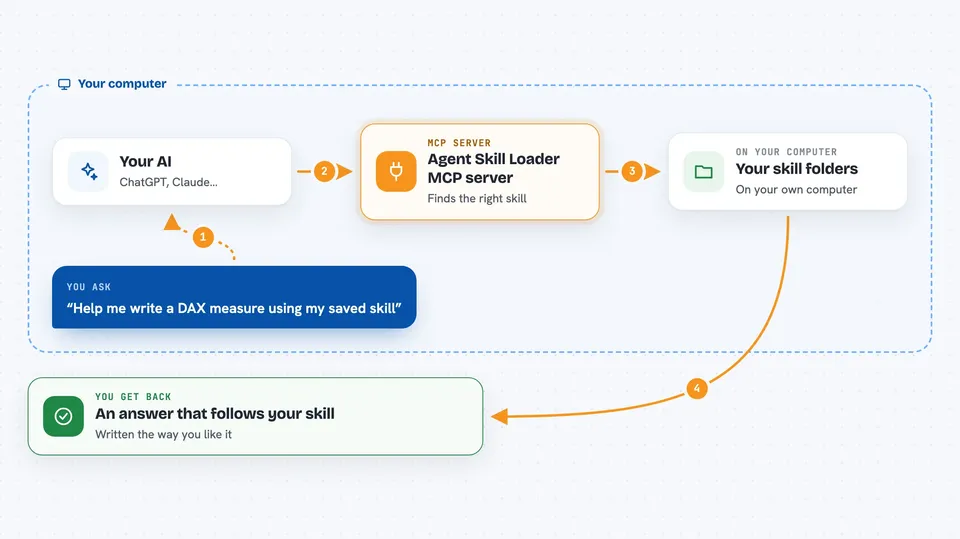
You ask your AI to do something, like write a certain kind of report. The AI uses this helper to scan the folders where your skill files live. The helper finds a matching skill and hands its instructions back to the AI. The AI then follows those instructions to answer you. If you add a new skill file later, the helper notices and tells your AI it is there.
 Click to zoom
What you can do with it
- List all the skills available in your folders
- Search your skills by name or description
- Read the full instructions of one skill
- Save a skill permanently into your project folder
- Add or remove skill folders while the AI is running
- Check which folders are being scanned and spot problems
- Use a skill directly as a slash command in some apps
Try asking your AI
- “I need to write a DAX measure but I'm not sure about the best practices.”
- “What skills do I have for writing reports?”
- “Show me the instructions in my writing-dax-measures skill.”
- “Add my F drive skills folder to the list and tell me what you find.”
What it gives back to you
You get answers in the chat that follow your own skill instructions, so they match how you like things done. If you ask for a list, you get a simple list of skill names and short descriptions. If you ask to read one, you see its full text. When you add or remove a folder, you get a short confirmation.
Before you start
What you need
- Node.js version 18 or newer
- At least one folder with skill files (each skill is a folder containing a SKILL.md file)
- An AI app that supports MCP servers, such as Claude Desktop or Cursor
Good to know
The install_skill tool copies files into your project, so check the target folder is the one you want before you let it run.
Install it with your AI
Add Agent Skill Loader MCP server to your AI, no technical skills needed
You don't install anything by hand. You copy one prompt, paste it into an AI that can work on your computer, and it checks, installs and connects the server for you, asking you when it needs something.
Sign in to get the install prompt
Members get a ready-made prompt that lets the Claude desktop app check Agent Skill Loader MCP server, install it and connect it for them, step by step. You don't need any technical skills: you copy, paste and answer a few questions. Your connected AI can also find and install any of the 4,609 MCP servers here for you.
Who it's for
People who already keep a personal library of Claude Code skills and want their AI assistant to use them without manual copying.



