
MCP server · Security
MCPSkills trust check server
Check if an MCP server, AI skill, or npm package is safe before you install it.
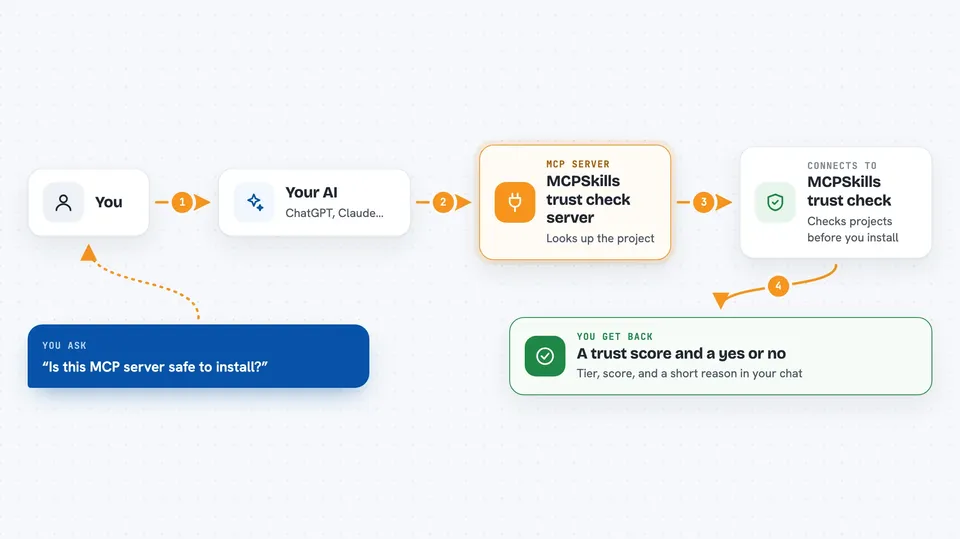
This is a small helper that lets your AI look up how trustworthy a piece of software is before you add it to your setup. You ask your AI to check a GitHub repo, an npm package, or an AI skill, and it comes back with a score and a plain yes or no. It is handy for anyone who installs MCP servers or AI skills and wants to avoid nasty surprises.
What is an MCP server? The 30-second version
On its own, your AI can only chat with you. An MCP server is a small helper program that gives your AI a new skill or a connection to an outside service. This one connects your AI to the MCPSkills scoring service, so your AI can look up trust scores and safety scans for you. You just ask in normal words, and the helper does the checking behind the scenes.
What this MCP server does
You ask your AI something like whether a certain MCP server is safe to install. Your AI passes that request to this helper, which calls the MCPSkills scoring service on the web. That service looks at the project on GitHub and other sources, then works out a trust score and runs safety checks. The helper hands the result back to your AI, and your AI shows it to you in the chat as a score, a tier, and a short explanation.
 Click to zoom
What you can do with it
- Score a GitHub repo, npm package, or registry link before you install it
- Run a focused safety scan for prompt injection, credential theft, and sneaky code
- Get a simple go or no-go answer with the reasoning behind it
- Browse a curated list of pre-scored skill packages by use case
- Generate a trust badge image link for your own project's README
- Watch a repo and get told when its trust score changes
- Check several repos in one go (up to 5 at a time on paid plans)
Try asking your AI
- “Score anthropics/anthropic-sdk-typescript”
- “Is this MCP server safe? modelcontextprotocol/servers”
- “Should I install this MCP server? 21st-dev/magic-mcp”
- “Show me safe AI skill packages for full-stack development”
What it gives back to you
You get back a trust tier (Verified, Established, New, or Blocked), a composite score, and four dimension scores called Alive, Legit, Solid, and Usable. Safety scans come back as findings about things like prompt injection or credential theft. For a go or no-go question, you get a simple yes or no plus the reasoning. Everything shows up as text in your chat, and badges come back as a link to an image.
Before you start
What you need
- Node.js installed on your computer (the helper runs through npx)
- An MCP client such as Claude Code, Cursor, or Claude Desktop
- An MCPSkills API key for full reports and for the watch features (a kind of password for apps; you get one at mcpskills.io/api, paid plans start at $19/mo)
Good to know
It only reads and scores public information, so it does not change or delete anything on your machine, but the scores are opinions from a third-party service and a good score is not a guarantee that software is safe.
Install it with your AI
Add MCPSkills trust check server to your AI, no technical skills needed
You don't install anything by hand. You copy one prompt, paste it into an AI that can work on your computer, and it checks, installs and connects the server for you, asking you when it needs something.
Sign in to get the install prompt
Members get a ready-made prompt that lets the Claude desktop app check MCPSkills trust check server, install it and connect it for them, step by step. You don't need any technical skills: you copy, paste and answer a few questions. Your connected AI can also find and install any of the 4,361 MCP servers here for you.
Who it's for
Developers, security-minded tinkerers, and anyone who installs MCP servers or AI skills and wants a quick safety check first.




