
MCP server · Finance and crypto
Alpha Vantage MCP server
by berlinbra
Lets your AI look up stock quotes, crypto prices, ETF details and earnings straight from Alpha Vantage.
This is a small helper that connects your AI assistant to Alpha Vantage, a free service that tracks stock and cryptocurrency prices. Once it is set up, you can just ask your AI for a quote or a company fact and it will go and fetch it for you. It is handy for anyone who follows markets at work but does not want to open five different websites.
What is an MCP server? The 30-second version
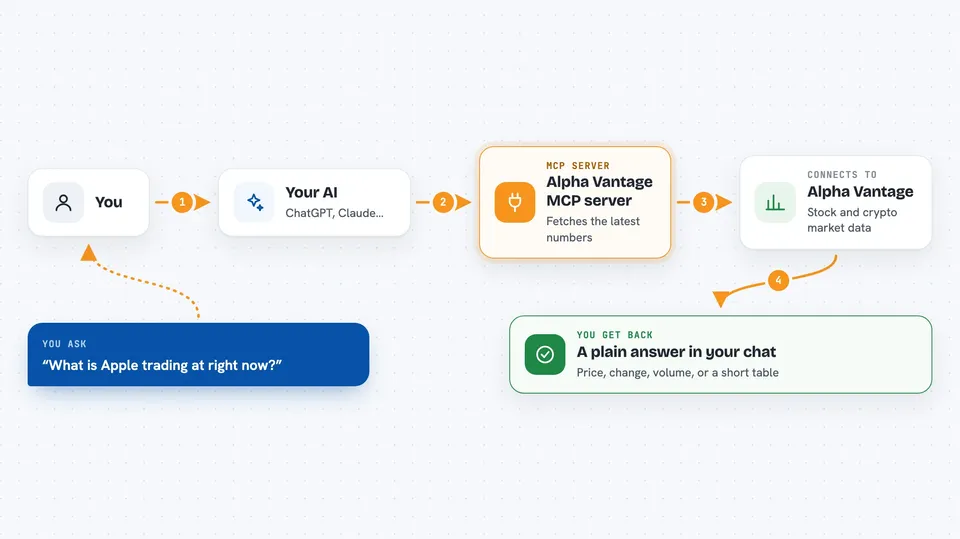
On its own, your AI can only chat with you using what it already knows. An MCP server is a small helper program that gives your AI a new skill, in this case a connection to Alpha Vantage. When you ask about a stock or a coin, your AI passes the question to this helper, the helper asks Alpha Vantage, and the answer comes back into your chat. You do not have to copy numbers around yourself.
What this MCP server does
You ask your AI something like what is Apple trading at right now. The AI sends that request to this helper program running on your computer or in the cloud. The helper talks to the Alpha Vantage service over the internet and asks for the latest data. Alpha Vantage sends back the numbers, and the helper hands them to your AI. Your AI then writes the answer out for you in plain language in the chat window.
 Click to zoom
What you can do with it
- Get the latest price, change and volume for a stock
- Look up a company's sector, industry and market cap
- Check the current exchange rate for a cryptocurrency like Bitcoin
- See daily, weekly or monthly price history for a coin
- Review an ETF's holdings and sector breakdown
- Find upcoming earnings dates for companies
- Pull historical earnings reports for a company
What it gives back to you
You get back short, readable answers in the chat: a price with the change and volume, a company summary, a list of recent daily prices, or a table of ETF holdings. For crypto you get the exchange rate plus bid and ask prices. For options and earnings you get the relevant contracts or dates. Everything arrives as text you can read or copy.
Before you start
What you need
- A free Alpha Vantage account and API key (a kind of password for apps; the Alpha Vantage site gives you one for free)
- Docker installed if you use the Docker setup, or Python with uv if you run it from source
- The Claude desktop app or another AI app that supports MCP servers
Good to know
The real-time options tool needs a paid Alpha Vantage plan and will show fake demo data on a free key, so use the historical options tool instead if you are on the free tier.
Install it with your AI
Add Alpha Vantage MCP server to your AI, no technical skills needed
You don't install anything by hand. You copy one prompt, paste it into an AI that can work on your computer, and it checks, installs and connects the server for you, asking you when it needs something.
Sign in to get the install prompt
Members get a ready-made prompt that lets the Claude desktop app check Alpha Vantage MCP server, install it and connect it for them, step by step. You don't need any technical skills: you copy, paste and answer a few questions. Your connected AI can also find and install any of the 4,361 MCP servers here for you.
Who it's for
Anyone who checks stock or crypto prices during the workday, like analysts, finance staff, or people who just follow the markets.




