MCP server · Research
Clojars MCP server
by Bigsy
Lets your AI look up Clojure library versions and history on Clojars for you.
This is a small helper that connects your AI assistant to Clojars, the place where Clojure libraries live. Once it is set up, you can ask your AI things like the newest version of a library and it will go check for you. It is handy if you work with Clojure code and want quick, up-to-date answers without opening a browser.
What is an MCP server? The 30-second version
On its own, your AI can only chat with you using what it already knows. An MCP server is a small helper program that gives your AI one new skill or a connection to an outside service. This one connects your AI to Clojars, the community library site for Clojure. So when you ask about a Clojure library, your AI can actually go look it up on Clojars instead of guessing.
What this MCP server does
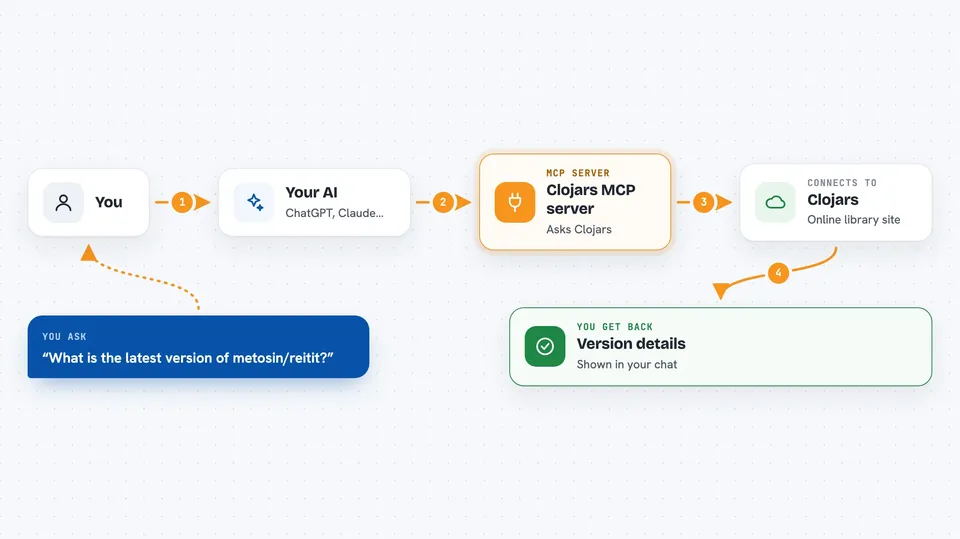
You ask your AI a question about a Clojure library, like what the latest version is. Your AI passes that question to this helper program. The helper then asks Clojars, the online library site, for the answer. Clojars sends back the version details, and your AI shows them to you in the chat. It can also check whether a specific version exists and list older versions.
 Click to zoom
What you can do with it
- Find the latest version of any Clojars library
- Check whether a specific version of a library exists
- List the version history of a library
- Limit how many past versions you want to see
- Look up libraries by their group and artifact name
Try asking your AI
- “What is the latest version of metosin/reitit on Clojars?”
- “Does version 0.7.2 of metosin/reitit exist?”
- “Show me the last 10 versions of metosin/reitit”
- “Give me the version history for ring/ring-core”
What it gives back to you
You get short, focused answers in the chat. For a latest version question, it tells you the version number. For an existence check, it says yes or no. For history, it gives you a list of past versions, up to the number you asked for.
Before you start
What you need
- The Claude desktop app or another AI tool that supports MCP servers
- Node.js installed on your computer (the free program that runs this helper)
- Internet access so the helper can reach Clojars
Good to know
It only reads information from Clojars, so it will not change or delete anything on your computer or online.
Install it with your AI
Add Clojars MCP server to your AI, no technical skills needed
You don't install anything by hand. You copy one prompt, paste it into an AI that can work on your computer, and it checks, installs and connects the server for you, asking you when it needs something.
Sign in to get the install prompt
Members get a ready-made prompt that lets the Claude desktop app check Clojars MCP server, install it and connect it for them, step by step. You don't need any technical skills: you copy, paste and answer a few questions. Your connected AI can also find and install any of the 4,361 MCP servers here for you.
Who it's for
Clojure developers and anyone who works with Clojure libraries and wants quick version checks without leaving their chat.